NSFAS online application: NSFAS Online Application: Complete Guide 2026
Submitting your NSFAS online application is the most critical step in securing government funding for your studies. The National Student Financial Aid Scheme (NSFAS) provides comprehensive bursaries to South African students who need financial support. This guide is your complete, step-by-step manual for the 2026 application cycle. We will walk you through every single part of the process, from checking your eligibility to hitting the submit button, ensuring you avoid the common mistakes that lead to delays or rejection.
What Is NSFAS and Why It Matters
The National Student Financial Aid Scheme (NSFAS) is a South African government bursary programme. It exists to provide financial assistance to students from poor and working-class backgrounds. Its goal is to break the cycle of poverty by making tertiary education accessible.
For you, the student, this means your dream of studying at a public university or TVET college can become a reality, regardless of your family’s financial situation. The NSFAS funding is not a loan; it’s a bursary you do not have to repay if you meet the academic conditions.
What does the NSFAS bursary cover? It is designed as full-cost funding:
- Full Tuition Fees: Paid directly to your chosen institution.
- Accommodation: Covered as per your institution’s accredited accommodation or an approved private allowance.
- Learning Material Allowance: Money for books, laptops, and other essential resources.
- Personal Care Allowance: A monthly living stipend for food and personal items.
- Transport Allowance: For students who qualify as commuters.
Who This Topic Applies To
This NSFAS online application guide is essential for:
- First-Time Applicants: Current Grade 12 learners and out-of-school youth applying for the first time for the 2026 academic year.
- Returning Students: Students currently funded by NSFAS who are progressing to the next year of their qualification.
- TVET College Applicants: Those seeking to study at any public Technical and Vocational Education and Training college.
- University Applicants: Those seeking to study for an undergraduate qualification at any of the 26 public universities.
- Parents and Guardians: Anyone helping a student navigate the myNSFAS account and application process.
What is NSFAS Online Application?
The NSFAS Online Application is the digital process through which South African students apply for government-funded financial aid to study at public universities and TVET colleges.
In simple terms, it is the official website and system (found at www.nsfas.org.za) where you:
- Create a myNSFAS account.
- Fill in and submit your application form electronically.
- Upload your certified supporting documents (like ID, proof of income).
- Track the status of your funding request.
Key Things to Know:
- It’s the Only Official Way to Apply: NSFAS no longer accepts paper applications. All applications must be submitted online via their portal.
- It’s Free: The application process is completely free. If anyone asks you for payment to apply, it is a scam.
- It’s for Bursaries, Not Loans: The funding you apply for is a bursary, meaning you do not have to repay it if you pass your academic modules each year.
- You Need an Account: To apply, you must first register for a myNSFAS account using your South African ID number, a personal email address, and a cellphone number.
What You Do in the NSFAS Online Application:
- Provide Personal & Household Details: You enter your information and your parents’/guardians’ details, including household income.
- Choose Your Institution & Qualification: You state where you have applied or been accepted to study.
- Submit Digital Documents: You upload certified copies of all required paperwork.
- Get a Reference Number: After submitting, you get a unique number to track your application.
- Check Your Status: You log back into your account to see if your application is “Received,” “Approved,” or “Unsuccessful.”
Why It Matters:
The NSFAS online application is the essential first step for hundreds of thousands of students each year to access funding that covers tuition, accommodation, books, and a living allowance. Without successfully completing it, you cannot be considered for NSFAS funding.
In short: It’s the mandatory online gateway to apply for a government study bursary.
Requirements and Eligibility
Your NSFAS application will only be considered if you meet all the following criteria. Check this list carefully before you begin.
Citizenship:
- You must be a South African citizen or permanent resident.
Household Income Thresholds:
This is the most important financial test. Your total household income must be below these caps:
- Standard Threshold: Combined gross annual household income must be R350,000 or less.
- Students with Disabilities: Combined gross annual household income must be R600,000 or less.
- SASSA Grant Recipients: You automatically meet the financial eligibility, but you MUST still apply.
Academic Requirements:
- You must be applying or intending to apply to study at a public TVET college or university in 2026.
- You must be accepted or qualify for admission into a funded programme (check the NSFAS website for the list of approved qualifications).
- Returning students must pass their modules and meet the N+ rule for continued funding.
Special Cases:
Additional support and documentation are required for:
- Students with disabilities.
- Orphans and vulnerable children.
- Students from military veteran families.
Step-by-Step Process: Your 2026 NSFAS Online Application
Follow these numbered steps precisely to complete your application successfully.
Step 1: Prepare Before the Portal Opens
Gather all your documents (see next section). Ensure you have a reliable email address and cellphone number you use regularly. These are your lifelines for communication.
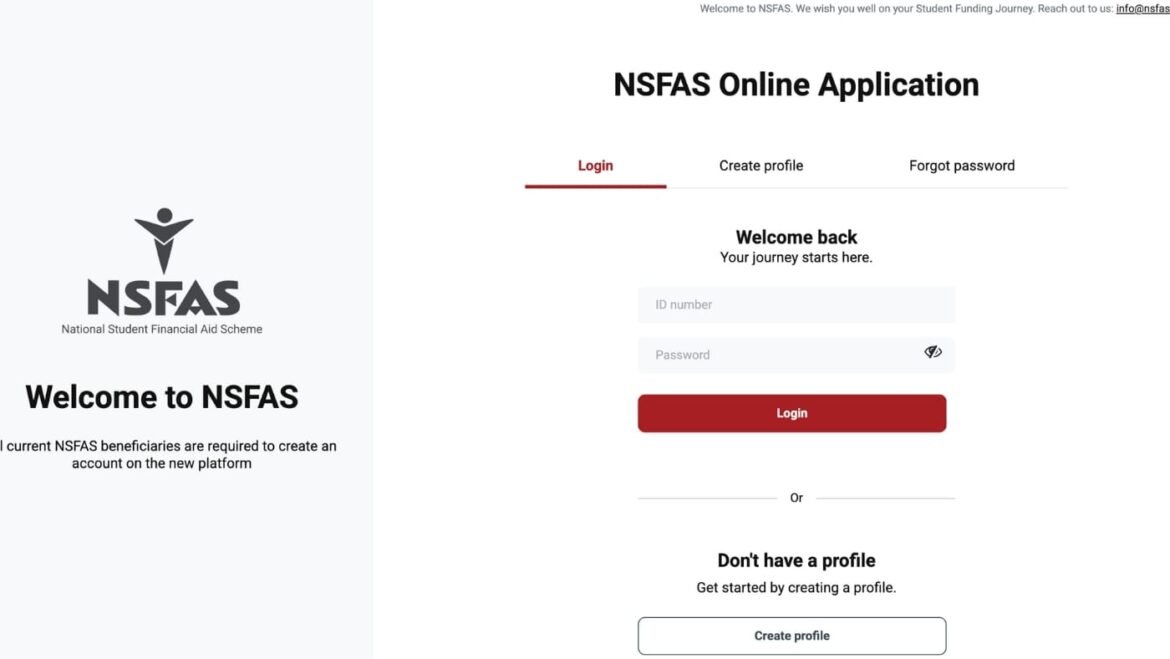
Step 2: Create or Access Your myNSFAS Account
- Go to the official website: www.nsfas.org.za.
- Click on the ‘myNSFAS’ portal button.
- If you are a new user, click “Register.” Allow NSFAS to validate your details.
- Enter your South African ID number. Follow the prompts to provide your email, cellphone number, and create a secure password.
- You will receive a One-Time Pin (OTP) to verify your details. Your myNSFAS account is now active.
Step 3: Start the Official Application
- Log into your myNSFAS account.
- Click on the “APPLY” tab. (This tab is only active during the official application period).
- Fill in every field of the online form with absolute accuracy. This includes personal details, household information, and academic details.
Step 4: Upload Certified Supporting Documents
- You will be prompted to upload certified copies of all required documents.
- Ensure each file is clear, readable, and in the correct format (PDF, JPEG, PNG).
- Do not submit the application until all documents are uploaded.
Step 5: Review and Submit
- Carefully review every section for errors. A wrong digit in an ID number can cause major delays.
- Submit your application.
- CRUCIAL: You will receive a reference number immediately. Save this number in a secure place. It is your key for tracking your NSFAS status check.
Step 6: Track Your Application Status
- Log into your myNSFAS account regularly.
- Click “Track Application Progress” to see updates like “Submitted,” “Filtering,” “Validation,” or “Funding Eligibility.”
Documents Needed for Your 2026 Application
Incorrect or missing documents are the top reason for application rejection. Here is your checklist.
Mandatory Documents for All Applicants:
- Certified copy of your SA ID (or birth certificate if under 16). Certification must not be older than 3 months.
- Certified ID copies of both parents, guardians, or spouse.
- Proof of income (if applicable): recent payslips, employment letter, or SASSA grant proof.
- If parents/guardians are unemployed, a sworn affidavit or a SASSA affidavit confirming this.
- Your own cellphone number and email address for the application.
Additional Documents for Specific Cases:
- People with Disabilities: Completed Disability Annexure A Form.
- Orphans/Vulnerable Children: Court order, death certificate(s), or letter from a registered social worker.
- Retrenched Parents: Official retrenchment letter.
Certification Rules:
- A Commissioner of Oaths (at a police station, post office, or bank) must certify documents.
- The stamp must be clear and include: “Certified True Copy,” date, signature, and the commissioner’s full name and details.
Upload Tips:
- Scan documents properly; phone photos are acceptable if clear and well-lit.
- Keep file sizes small (under 2MB) for easier uploading.
- Name your files clearly (e.g., YourName_IDDocument.pdf).
Common Problems and Solutions
Even perfect applications hit snags. Here’s how to solve frequent NSFAS online application issues.
Problem 1: “ID Number Already Exists” or “Invalid ID” during registration.
- Solution: You likely have an existing myNSFAS account from a previous application. Use the “Forgot Password” function on the login page to regain access. Do not create a duplicate account.
Problem 2: Unable to upload documents or portal errors.
- Solution: Use Google Chrome or Firefox. Clear your browser cache. Try uploading during off-peak hours (early morning or late evening). Ensure your files are not corrupted and are in the correct format.
Problem 3: Application status is stuck on “Validation” for weeks.
- Solution: The validation process, which checks data with Home Affairs and SARS, can be lengthy. Continue to monitor patiently. If it extends far beyond published timelines, submit a query via the NSFAS contact centre, quoting your reference number.
Problem 4: Status reads “Unsuccessful.”
- Solution: Log in to see the specific reason. If you believe it is an error or have new supporting evidence, you MUST lodge a formal appeal through your myNSFAS account during the official appeal window. This period is strict and limited.
Problem 5: “Awaiting Registration” but I am already registered at my institution.
- Solution: This means NSFAS has approved you but is waiting for your university/TVET college to confirm your registration details. Contact your institution’s financial aid office directly to ensure they have submitted your data to NSFAS.
Important Tips and Warnings for 2026
Pro-Tips for a Successful Application:
- Apply on Day One: Do not wait for the deadline. Applications open in [Month] 2025 for the 2026 academic year.
- Accuracy is Non-Negotiable: Cross-check all ID numbers, names, and financial information with official documents.
- Save Everything: Keep hard copies and digital scans of your entire application and reference number.
- Official Communication Only: NSFAS will only contact you via your myNSFAS account portal and the email/phone you registered.
Critical Warnings to Heed:
- Beware of NSFAS Scams: NSFAS will NEVER ask for your password, OTP, or payment to process your application. Anyone calling or emailing asking for this is a scammer. Only use www.nsfas.org.za.
- Respect All Deadlines: The application closing date, document submission deadline, and appeal period are final. Set multiple reminders.
- Avoid Instant Rejection: Ensure your household income is within the threshold, you are applying for a funded qualification, and every document is certified correctly.
Frequently Asked Questions (FAQ)
Q: When does the 2026 NSFAS online application open and close?
A: The application period typically opens in [Month] 2025 and closes in [Month] 2026. You must confirm the exact dates on the official NSFAS website and social media channels as soon as they are announced.
Q: How do I do an NSFAS status check?
A: Log into your myNSFAS account and click “Track Application Progress.” Your current status will be displayed there.
Q: I am a SASSA recipient. Is my application different?
A: Your financial eligibility is automatic, but you must still complete the full NSFAS online application and submit your ID documents. Do not assume you are automatically funded.
Q: What is the NSFAS N+ Rule?
A: ‘N’ is the minimum number of years of your programme. The ‘+1’ is an extra year NSFAS funds for a repeat or change of course. For a 3-year degree, you get 4 years of funding (3+1).
Q: Can I apply for NSFAS if I already have another qualification?
A: Generally, no. NSFAS funds your first undergraduate qualification. There are rare exceptions for selected postgraduate programmes listed on their website.
Q: How and when will I receive my allowances?
A: Allowances are paid after NSFAS confirms your registration with your institution. Your university or TVET college will inform you of their payment system, whether via a NSFAS wallet, direct bank transfer, or institutional payment.
Conclusion:
Submitting your NSFAS online application for 2026 is a process that demands attention to detail but is entirely manageable with the right guidance. This application is more than just a form; it is an investment in your future. By following this complete guide, you have significantly increased your chances of success.
Start preparing your documents today. Mark the application opening date on your calendar. Apply early, be thorough, and use only official NSFAS channels for information. Your education is worth this effort. Take a deep breath, take it step-by-step, and take control of your future by applying for NSFAS funding.