How to recover MyNSFAS username and password in 2026: The Complete Reset Guide. Losing access to your online funding portal can feel like a major setback in your education journey. This definitive guide on How to Recover MyNSFAS Username and Password for 2026 is designed to solve that problem quickly and securely.
The NSFAS (National Student Financial Aid Scheme) portal is your lifeline for applications, signing agreements, and checking your funding status. When you can’t log in, you risk missing critical deadlines and updates.
This matters because timely recovery of your myNSFAS account credentials ensures your funding process remains on track, preventing unnecessary stress and potential financial disruption to your studies. Consider this your step-by-step manual to regain control of your account with confidence.
What is MyNSFAS Username and Password Recovery and Why It Matters
Your MyNSFAS username is typically the personal email address you used when registering your account. Your password is the secure key you created. Recovery is the official process provided by NSFAS to reset these credentials when you have forgotten them or are locked out of your account.
This MyNSFAS username and password recovery guide is for any South African student or parent who has lost access to their portal. It applies whether you are a first-time applicant who can’t remember their details or a returning student whose login suddenly fails.
This guide covers the complete myNSFAS account recovery process. It includes resetting a forgotten password, retrieving a forgotten username (email), and troubleshooting common errors during recovery. Essentially, it provides the solutions you need when the standard NSFAS login process fails.
Who This Topic Applies To
The need to recover portal access is a common issue that crosses all student categories. This guide is essential for:
- First-Time Applicants: If you created an account months ago and have now forgotten the details as the application window opens, you need this recovery process before you can apply.
- Returning NSFAS Students: Funded students must log in annually to sign their NSFAS Bursary Agreement. Forgetting your login credentials can delay this crucial step and potentially hold up your allowances.
- TVET College and University Students: The recovery process is identical for all students at public institutions funded by NSFAS. The system does not differentiate based on institution type.
- SASSA Grant Beneficiaries: While your financial eligibility is pre-confirmed, you still need full access to your myNSFAS account to complete and manage your application. Recovery steps are the same.
- Parents and Guardians: Assisting a student often means helping them manage their portal. Understanding recovery is key when login details are misplaced.
Requirements for MyNSFAS Username and Password Recovery
Before you begin the recovery process, you must have certain information or access ready. The system will ask for these to verify your identity.
- Access to Your Registered Email Address: This is the most critical requirement. For a password reset, NSFAS will send a link to this email. To recover a forgotten username, you need to know which email you used.
- Access to Your Registered Cellphone Number: Your South African mobile number is tied to your account for security. The recovery process will likely involve receiving a One-Time Pin (OTP) via SMS to this number.
- Your South African ID Number: You will be asked to enter your ID number during the recovery process to verify your identity against NSFAS records.
- Stable Internet Connection: A reliable connection is needed to load the recovery pages correctly and receive emails without interruption.
How to Recover MyNSFAS Username and Password (Step-by-Step Guide)
Follow these clear, beginner-friendly steps to regain access to your account. The process differs slightly depending on whether you forgot your password or your username (email).
How to Reset a Forgotten MyNSFAS Password
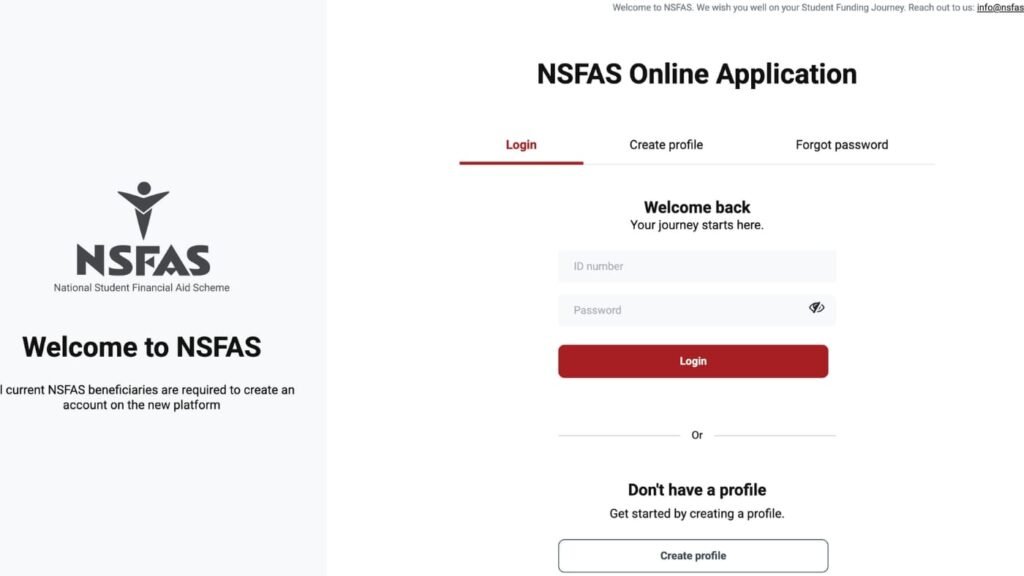
- Navigate to the NSFAS Login Page: Open your browser and go to the official NSFAS website: www.my.nsfas.org.za. Click on the ‘myNSFAS’ tab.
- Initiate Password Reset: On the login page, look for and click the link that says ‘Forgot your password?’ or similar. This is usually located near the login fields.
- Enter Your Username/Email: You will be prompted to enter the email address you use as your MyNSFAS username. Type it carefully and click ‘Submit’.
- Check Your Email Inbox: NSFAS will send a password reset link to that email address. Open your email (check your Spam or Junk folder if you don’t see it) and look for an email from NSFAS.
- Click the Secure Link: Open the email and click on the password reset link provided. This will redirect you back to a secure NSFAS page.
- Create a New Password: You will be asked to enter a new, strong password. Create a unique password and confirm it by typing it again. Use a mix of letters, numbers, and symbols.
- Log In with New Details: Once your password is successfully reset, return to the main NSFAS login page. Enter your username (email) and your new password to access your account.
How to Recover a Forgotten MyNSFAS Username
- Go to the NSFAS Login Page: As above, visit www.nsfas.org.za and click ‘myNSFAS’.
- Initiate Username Recovery: On the login page, look for a link that says ‘Forgot your username?’ or ‘Recover username’. Click it.
- Provide Identification Details: You will be asked to verify your identity. This typically involves entering your South African ID number and the cellphone number registered to your account.
- Receive Your Username via SMS: After successful verification, NSFAS will send an SMS to your registered phone number. This SMS will contain the email address that serves as your MyNSFAS username.
- Proceed to Login: Once you have your username, you can return to the login page. If you also forgot your password, now follow the password reset steps outlined above.
Common Problems and Solutions in Account Recovery
Students often face specific hurdles during the MyNSFAS username and password reset process. Here are the most frequent issues and how to solve them.
- Problem: Not receiving the password reset email.
- Solution: First, meticulously check your Spam, Junk, or Promotions folders. Wait 15-30 minutes as emails can be delayed. Ensure you entered the correct email address. If nothing arrives, you may need to re-initiate the process or contact NSFAS to confirm your registered email.
- Problem: Not receiving the OTP/SMS during recovery.
- Solution: Ensure your phone has network reception. Check for any blocked numbers. Wait a few minutes and request the OTP again. Verify that the phone number you are using is the exact one linked to your myNSFAS account.
- Problem: “Your details could not be verified” or “User not found” error.
- Solution: This usually means the ID number, email, or phone number you entered does not match the records NSFAS has on file. Double-check for typos. If you recently updated your details (e.g., got a new phone number), you may need to contact NSFAS support directly, as your portal records are outdated.
- Problem: The reset link is expired or doesn’t work.
- Solution: Password reset links are time-sensitive for security. If you click the link after a long delay, it may have expired. Go back to the NSFAS login page and start the ‘Forgot your password’ process again to generate a fresh, active link.
- Problem: Account is permanently locked after multiple failed attempts.
- Solution: For security, accounts can be locked. If waiting 24 hours does not unlock it, you cannot resolve this through self-service. You must contact the NSFAS call centre or visit a NYDA office for direct assistance to unlock your account.
Important Tips and Warnings for a Secure MynSFAS Username and Password Recovery
- Beware of Phishing Scams (CRITICAL): NSFAS will NEVER ask for your ID, password, or banking details via WhatsApp, phone call, or a suspicious email. Only use the recovery links on the official www.nsfas.org.za website. Do not use links sent by strangers on social media.
- Update Your Contact Details Proactively: Once you successfully recover and log into your account, immediately go to your profile section. Ensure your email address and cellphone number are current and correct. This prevents future recovery issues.
- Mind the Application Deadlines: Account recovery can take time. Do not wait until the day before the NSFAS application closes to try and remember your login. Start the recovery process well in advance of any deadline.
- Use a Password Manager: To avoid this situation in the future, consider using a secure password manager app (like those built into smartphones or browsers) to safely store your myNSFAS account username and password.
- Never Share Your OTP: The OTP sent to your phone is the final key to your account. Anyone asking for this OTP is trying to scam you. NSFAS will never ask for it over the phone.
Frequently Asked Questions (FAQ)
Q: Can I recover my MyNSFAS username without my phone number?
A: It is very difficult. Your registered cellphone number is a primary security verification tool. If you no longer have access to that number, you will most likely need to contact the NSFAS call centre for assisted verification using other personal details.
Q: I tried to recover my password, but the email I think I used isn’t working. What now?
A: You may have used a different email address. Try every email you own. If none work, you likely need to recover your username first (using your ID and phone number) to confirm which email is on file, then proceed with the password reset.
Q: How long does the password reset link from NSFAS remain active?
A: For security reasons, these links typically expire after 1 to 24 hours. It is best to click the link and reset your password immediately after receiving the email.
Q: Is the account recovery process the same for TVET college students?
A: Yes, absolutely. The MyNSFAS account recovery system is a single, central platform for all NSFAS applicants and beneficiaries, regardless of institution.
Q: What is the official NSFAS contact number for help if self-recovery fails?
A: The official NSFAS contact centre is 08000 67327. Have your ID number ready when you call. You can also visit a National Youth Development Agency (NYDA) office for in-person support.
Q: Can I create a new myNSFAS account if I can’t recover the old one?
A: No. Creating a duplicate account with a new email will cause serious system conflicts, delays, and potential rejection of your application. Your ID number is permanently linked to your first account. You must recover the original one.
Conclusion.
Being locked out of your myNSFAS account is a frustrating but solvable problem. This guide has equipped you with the precise steps for how to recover your MyNSFAS username and password securely and efficiently. Remember, this is a routine process used by thousands of students each year.
Do not panic. Approach the recovery methodically, follow the steps, and use the tips to avoid scams. Regaining access is your right as an applicant or funded student.
Take action as soon as you realise there’s an issue—don’t let a forgotten password become a barrier to your education funding. Your journey is important, and with your portal access restored, you can confidently continue managing your NSFAS support towards achieving your academic goals.
1. MyNSFAS Login for South African Students
2. How to Login MyNSFAS Account – Complete Guide
3. How to Create myNSFAS Account Online
4. NSFAS South Africa Student Funding Eligibility – Complete Guide
5. Who Qualifies for NSFAS Funding – Complete Guide
2 comments
I can’t long or appeal my nsfas account because I lost my phone number and my ID number can I get help
I can’t log in to my Nsfas account because I lost my phone so I forgot my password cause it was saved on my phone and I lost my email too , can I get help?