
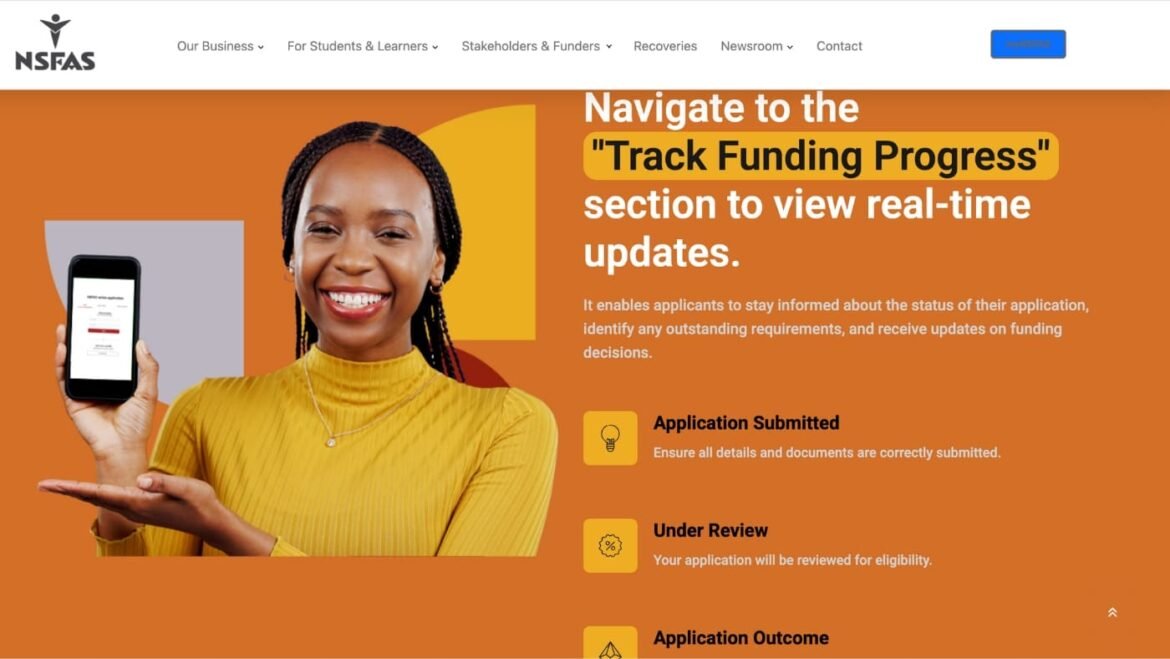
NSFAS Status Check: Complete Guide 2026. After you’ve submitted your application, the waiting begins. Understanding how to perform your NSFAS status check is crucial for your peace of mind and planning. The National Student Financial Aid Scheme (NSFAS) uses an online system to communicate your funding progress.
This guide will explain every single status you might see on your myNSFAS account, what it truly means for your 2026 funding, and exactly what to do next. Knowing your status empowers you to take action if needed and reduces the anxiety of waiting.
What Is NSFAS and Why It Matters
The National Student Financial Aid Scheme (NSFAS) is a South African government bursary programme. It provides full financial support to students from poor and working-class families to study at public universities and TVET colleges.
For you, checking your NSFAS status is how you know if your gateway to education is open. NSFAS funding covers what you need to study: tuition, accommodation, books, and a living allowance. It’s a bursary, not a loan, meaning you don’t pay it back if you pass your modules.
This makes your NSFAS status check one of the most important things you will do after applying. It dictates your next steps—from registering for your course to planning your budget for the year.
Who This Topic Applies To
This guide is essential for anyone who has applied for NSFAS and needs to understand the outcome. Specifically, it applies to:
- First-Time Applicants for 2026: You’ve submitted your application and are anxiously awaiting a response.
- Returning NSFAS Students: You need to confirm your funding has been renewed for the 2026 academic year.
- Students with Incomplete Statuses: Your status is unclear or has been stuck on one phase for too long.
- Parents and Guardians: You are helping a student track their application and understand the results.
- Applicants Who Need to Appeal: You received an “Unsuccessful” status and need to know your options.
Requirements and Eligibility for Funding
Before your status can be approved, your application must pass all NSFAS checks. The core NSFAS requirements are:
Citizenship:
- You must be a South African citizen or permanent resident.
Household Income:
- Your combined gross household income must be R350,000 or less per year.
- For students with disabilities, the threshold is R600,000 or less.
- SASSA grant recipients automatically qualify financially but must still apply.
Academic Requirements:
- You must be accepted or qualify for admission to a public university or TVET college for a funded qualification.
- Returning students must meet their institution’s academic progression policy (the N+ rule).
Special Cases:
- Students with disabilities, orphans, and other vulnerable groups have specific documentation requirements that must be met.
What is NSFAS Status Check
NSFAS Status Check is the process of logging into your official myNSFAS online account to see the current stage and decision of your funding application.
It is not a separate application—it is how you track the application you’ve already submitted. You do this by visiting www.nsfas.org.za, logging into myNSFAS, and clicking “Track Application Progress.”
What Your Status Shows:
Your status will display one of several key messages that tell you exactly what is happening:
- Application Submitted – They’ve received it.
- Filtering/Validation – They’re checking your details with Home Affairs and SARS.
- Funding Eligibility – Provisional approval! This is what most students wait for.
- Awaiting Registration – Your institution must confirm you’re registered.
- Unsuccessful – Your application was declined (with a reason given).
Why NSFAS Status Check Matters to YOU:
- It’s Your Only Source of Truth: The status in your myNSFAS portal is the official, real-time update on your funding. Don’t rely on rumours, WhatsApp groups, or unverified websites.
- It Determines Your Next Steps: Your status tells you what to do.
- “Funding Eligibility” means you can proceed to register at your institution.
- “Awaiting Registration” means you should contact your university’s financial aid office.
- “Unsuccessful” means you must act immediately to appeal during the short appeal window.
- It Reduces Anxiety and Prevents Scams: Constantly wondering “Did I get it?” is stressful. Checking your official status gives you certainty and prevents you from falling for scammers who promise to “check your status for a fee.”
- It Helps Solve Problems: If your status is stuck for months, it alerts you to contact NSFAS or your institution to resolve any issues before it’s too late.
In short: The NSFAS status check is your direct line to knowing if your financial future for the academic year is secure. It is a critical, non-negotiable step after applying. Ignoring it could mean missing a funding approval or missing your only chance to appeal a rejection.
How to Check Your NSFAS Status: Step-by-Step Process
Performing a NSFAS status check is straightforward if you follow these steps.
Step 1: Access the Official Portal
- Always start at the official website: www.nsfas.org.za.
- Click on the ‘myNSFAS’ portal link. This is the only authentic source for your status.
Step 2: Log Into Your myNSFAS Account
- Enter your username (usually your ID number) and the password you created during application.
- If you have forgotten your login details, use the “Forgot Password” function on the login page. Do not create a new account.
Step 3: Navigate to the Tracking Section
- Once logged in, look for a tab or button that says “Track Application Progress” or “Check Your Application Status”.
- Click on this button. This action is your official NSFAS status check.
Step 4: Interpret Your Status
- Your current status will be displayed clearly on the screen.
- Below, we explain every possible status in detail so you know exactly what yours means.
Step 5: Take the Required Action
- Based on your status, you may need to do nothing but wait, submit additional documents, or lodge an appeal. Your status message will often indicate the next step.
Understanding Your NSFAS Status Meanings
This is the core of the guide. Here is what each status on your myNSFAS account actually means.
1. Application Submitted
- Meaning: NSFAS has received your application. It is in the queue to be reviewed.
- What to do: Wait for the status to change. Ensure you have your reference number saved.
2. Filtering
- Meaning: NSFAS is conducting an initial check to see if you meet the basic criteria (citizenship, income threshold).
- What to do: This is a standard processing stage. No action is needed from you.
3. Validation
- Meaning: Your provided details (ID, parent/guardian info, income) are being cross-checked with government databases like the Department of Home Affairs and SARS. This stage can take time.
- What to do: Be patient. Long delays here are common due to system verification. If it extends for many months, you can contact NSFAS with your reference number.
4. Evaluation
- Meaning: All your documents and verified information are being assessed by a NSFAS official for a final funding decision.
- What to do: This is the last review stage. Double-check that your myNSFAS account has all correct documents uploaded.
5. Funding Eligibility
- Meaning: Congratulations! You have been provisionally approved for funding. NSFAS is now waiting for confirmation from your chosen university or TVET college that you have been academically accepted and registered.
- What to do: Ensure you have applied and been accepted to your institution. Follow up with their financial aid office.
6. Awaiting Registration
- Meaning: NSFAS has received your registration data from your institution. They are now finalising your funding package and setting up your allowances.
- What to do: Wait for allowance information. Your institution will communicate how and when you will receive your funds (e.g., via the NSFAS wallet, direct payment).
7. Unsuccessful
- Meaning: Your application for funding has been declined. You must log in to see the specific reason provided (e.g., “Household income exceeds threshold,” “Incomplete documentation”).
- What to do: Do not panic. Note the reason. If you believe it is an error or have new supporting evidence, you must lodge an appeal during the official appeal period via your myNSFAS account.
Common Problems and Solutions with Status Checks
Problem 1: Cannot log into myNSFAS account (forgotten details).
- Solution: Use the “Forgot Password” function on the login page. You will need the email and cellphone number linked to your account. If it fails, contact the NSFAS centre directly for help.
Problem 2: Status has been stuck on “Validation” or “Evaluation” for months.
- Solution: This is often due to high volumes. Wait it out initially. If it is far beyond the communicated processing times, submit a query on the NSFAS website or contact their centre with your ID and reference number.
Problem 3: Status says “Unsuccessful” but I believe I qualify.
- Solution: This is time-sensitive. Immediately log in, note the exact reason, and prepare your supporting documents. Lodge a formal appeal through the myNSFAS portal as soon as the appeal window opens. Missing this window means you must reapply next year.
Problem 4: Status shows “Funding Eligibility” but my institution says they don’t have my NSFAS confirmation.
- Solution: This is a communication gap. You must personally visit or contact the financial aid/bursary office at your university or TVET college with a copy of your status screen. They may need to manually capture your details.
Problem 5: No status update at all after application.
- Solution: Confirm you applied correctly and received a reference number. If you did, allow a few weeks for the system to update from “Submitted.” If there is still nothing, contact NSFAS to confirm your application was received.
Important Tips and Warnings
Essential Tips for a Smooth Process:
- Check Regularly, But Not Obsessively: Log in once a week for updates. Statuses do not change hourly.
- Use Correct Login Details: Creating multiple accounts will cause serious system errors and delays.
- Save Your Reference Number: Keep it in a safe place with your application documents.
- Communicate with Your Institution: Your university/TVET college’s financial aid office is a key partner. Keep them informed of your status.
Critical Warnings to Avoid Trouble:
- Beware of Status Check Scams: NSFAS will NEVER ask you to check your status via a WhatsApp link, Facebook message, or unofficial website. Only use www.nsfas.org.za. Never share your OTP or password with anyone.
- Do Not Miss Appeal Deadlines: If unsuccessful, the appeal period is your only second chance. It is strictly enforced and usually lasts for 30 days.
- “Funding Eligibility” is Not Cash in Hand: It means you are approved pending registration. Do not make financial commitments until your allowances are active and paid.
Frequently Asked Questions (FAQ)
Q: How often does the NSFAS status update?
A: There is no set schedule. It updates as your application moves through different verification stages. Check once a week for meaningful changes.
Q: I got “Funding Eligibility.” Am I 100% funded?
A: It means you are provisionally approved. Final funding depends on you registering for an approved qualification at your chosen institution and them submitting your registration data to NSFAS.
Q: What does the N+ rule mean for my status as a returning student?
A: The N+ rule determines if you qualify for continued funding. If you have exceeded the allowed time (N+1 years) for your qualification, your application for the next year will be marked “Unsuccessful.”
Q: My status is “Awaiting Registration.” What does that mean for my allowances?
A: It means NSFAS has your registration details and is processing your funding package. Allowances will be paid once this process is complete, usually early in the academic term. Your institution will inform you of the payment method.
Q: Can I call NSFAS to get a faster status update?
A: You can call for clarity if your status is unclear or has been stuck for an unusually long time. However, the call centre agents see the same status as you in your portal. Have your ID and reference number ready.
Q: What if I see a status I don’t understand?
A: Refer to this guide first. If it is not listed here, take a screenshot and contact NSFAS directly through their official channels for an explanation.
Conclusion:
Performing your NSFAS status check is a powerful tool that puts you in control of your funding journey. While the waiting period can be stressful, understanding what each status means removes the mystery and allows you to plan effectively.
Remember, “Funding Eligibility” is a major milestone worth celebrating. An “Unsuccessful” status is not the end—it’s a call to action to appeal. Use only your official NSFAS account for information. Protect your details from scammers and maintain clear communication with your institution.
Your education is a journey, and tracking your NSFAS status is a key part of navigating it successfully. Be patient, be proactive, and use this guide as your roadmap. Your future is worth the effort.
1. MyNSFAS Complete Guide: For Your Student Funding
2. NSFAS Online Application – (Apply Now)
3. How to Track NSFAS Application Online
4. How to Check NSFAS Status Online: A Complete Guide
5. What Does NSFAS Status Processing Mean? (Complete Guide)