
Creating an NSFAS account is the first and most important step for any South African student who wants to apply for government-funded financial assistance for higher education. The National Student Financial Aid Scheme (NSFAS) provides bursaries and loans to eligible students studying at public universities and TVET colleges across South Africa.
This comprehensive guide explains how to create NSFAS account, who qualifies, what documents you need, common mistakes to avoid, and what to do after registration. Whether you are a first-time applicant or assisting someone else, this article will walk you through the entire process in clear, practical detail.
What Is NSFAS?
The National Student Financial Aid Scheme (NSFAS) is a South African government entity under the Department of Higher Education and Training (DHET). Its main purpose is to provide financial support to students from poor and working-class households so they can access higher education.
NSFAS funding typically covers:
- Tuition fees
- Accommodation (institutional or private, within limits)
- Study materials and textbooks
- Living allowances
- Transport allowances (for qualifying students)
Before you can apply for funding, you must first create an NSFAS online account, also known as a myNSFAS account.
Why You Need an NSFAS Account
An NSFAS account allows you to:
- Submit an online funding application
- Upload required supporting documents
- Track the status of your application
- Receive important NSFAS notifications
- Sign your bursary agreement
- Update personal details when required
Without an NSFAS account, you cannot apply for NSFAS funding.
Who Should Create an NSFAS Account?
You should create an NSFAS account if you are:
- A South African citizen or permanent resident
- Planning to study or currently studying at a public university or TVET college
- From a household with a combined annual income of R350,000 or less
- A SASSA grant beneficiary (automatically qualifies financially)
Requirements Before Creating an NSFAS Account
Before starting the registration process, make sure you have the following:
Personal Requirements
- A valid South African ID number
- A working cellphone number
- A valid email address
Technical Requirements
- Internet access (mobile data or Wi-Fi)
- A smartphone, tablet, or computer
- Access to a scanner or camera (for document uploads later)
Documents You Will Need (For Application Stage)
While creating an account does not require document uploads, you will need these documents shortly after registration when applying:
Required Supporting Documents
- Certified copy of your South African ID
- Certified copy of parent/guardian ID (or spouse ID if married)
- Proof of income (payslips, affidavit, or SASSA letter)
- Consent form signed by parents/guardians
- Proof of disability (if applicable)
- Death certificate(s) if parents are deceased
It is best to prepare these documents in advance.
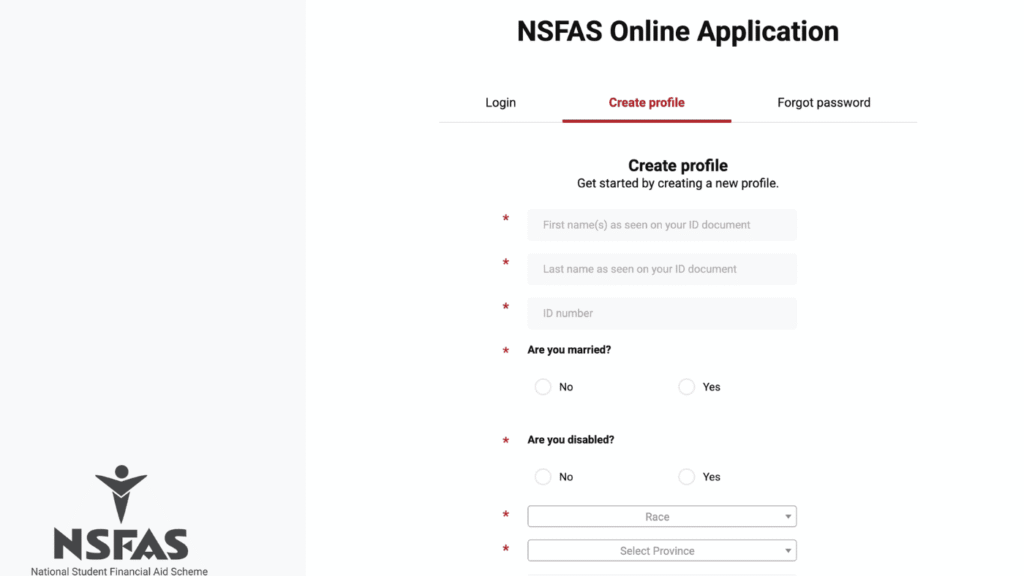
How to Create NSFAS Account 2026: Step-by-Step Guide
Step 1: Visit the Official NSFAS Website
Open your web browser and go to the official NSFAS website:
Always make sure you are on the official website to avoid scams.
Step 2: Click on “myNSFAS”
On the homepage, locate and click on “myNSFAS”. This will redirect you to the NSFAS login and registration page.
Step 3: Select “Register”
Since you are a new user, click on the “Register” option. This starts the NSFAS account creation process.
Step 4: Enter Your South African ID Number
You will be prompted to:
- Enter your 13-digit South African ID number
Ensure that:
- The ID number is correct
- It belongs to you
- You have not previously registered with NSFAS
If your ID number already exists in the system, you may need to recover your account instead of creating a new one.
Step 5: Provide Personal Information
You will be required to complete several personal details, including:
- Full names and surname (as per ID)
- Date of birth
- Gender
- Citizenship status
All details must match your official identity document exactly.
Step 6: Create Login Credentials
This step is crucial for account security.
Create a Username
- Use a unique username that you will remember
- Avoid using sensitive personal information
Create a Password
Your password must:
- Be at least 8 characters long
- Include uppercase and lowercase letters
- Include numbers
- Include a special character (e.g. @, #, !)
Make sure to store your login details safely.
Step 7: Enter Contact Information
You must provide:
- A valid email address
- An active South African cellphone number
NSFAS will use these details to:
- Send OTP verification codes
- Notify you about your application status
- Communicate important updates
Step 8: Accept Terms and Conditions
Read the NSFAS terms and conditions carefully. Once satisfied:
- Tick the checkbox to accept
- Confirm that all information provided is true and accurate
Providing false information may lead to disqualification.
Step 9: Verify Your Account (OTP Verification)
NSFAS will send a One-Time Pin (OTP) to:
- Your cellphone number, or
- Your email address
Enter the OTP on the website to verify your account.
Once verified, your NSFAS account will be successfully created.
What to Do After Creating an NSFAS Account
Creating an account does not automatically mean you have applied for funding. You must still complete the application process.
Log In to Your myNSFAS Account
Use your username and password to log in.
Complete Your NSFAS Application
- Fill in academic details
- Enter household financial information
- Upload required supporting documents
- Submit your application before the closing date
How to Upload Documents on NSFAS
Accepted File Formats
- JPEG
- PNG
File Size Guidelines
- Each document should be clear and readable
- Avoid blurry or cut-off images
- Certified documents should not be older than 3 months
Upload documents directly through your myNSFAS dashboard.
Common Problems When Creating an NSFAS Account
ID Number Already Exists
This means:
- You previously registered
- Someone may have registered on your behalf
Solution:
- Use the “Forgot Password” option
- Contact NSFAS support if you cannot recover access
OTP Not Received
Possible reasons:
- Network issues
- Incorrect phone number or email
- Delayed system response
Solution:
- Wait a few minutes and resend OTP
- Check spam/junk folder
- Ensure your details are correct
Website Not Loading
This often happens during peak application periods.
Solution:
- Try accessing the site late at night or early morning
- Use a different browser or device
- Clear browser cache
Tips for a Successful NSFAS Registration
- Use your own contact details, not someone else’s
- Double-check all information before submitting
- Do not create multiple accounts
- Keep copies of all uploaded documents
- Regularly log in to check application updates
NSFAS Account Security Tips
- Never share your password or OTP
- Avoid using public computers
- Log out after each session
- Change your password periodically
Scammers often target students during NSFAS application season, so remain vigilant.
Can You Create NSFAS Account Without Applying?
Yes. You can create an account at any time, but funding applications are only accepted during official NSFAS application windows. Creating an account early is recommended so you are ready when applications open.
Frequently Asked Questions About NSFAS Accounts
Can I Create an NSFAS Account If I Am Still in Grade 12?
Yes. Matric learners can create an NSFAS account and apply using their current school details.
Can I Change My Details After Registration?
Yes. Some personal and contact details can be updated via your myNSFAS account.
Is Creating an NSFAS Account Free?
Yes. NSFAS account creation and application are completely free.
Final Thoughts
Creating an NSFAS account is a simple but essential process for students seeking financial support for higher education in South Africa. By following the steps outlined in this guide, you can register successfully, avoid common mistakes, and move one step closer to securing NSFAS funding.
Always ensure that you use the official NSFAS website, provide accurate information, and submit your application before the deadline. With proper preparation and attention to detail, your NSFAS journey can begin smoothly and confidently.
Check also:
1. How to Login MyNSFAS Account – Complete Guide
2. How to Create myNSFAS Account Online