
How to Login MyNSFAS Account. Accessing your myNSFAS account is one of the most important steps in managing your NSFAS funding. Whether you are applying for the first time, checking your NSFAS status, uploading documents, or signing your bursary agreement, everything starts with a successful NSFAS account login.
Many students struggle with the login process due to forgotten passwords, incorrect details, or system errors. This guide explains how to login myNSFAS account step by step, who it applies to, what you need, and how to fix common problems.
If you rely on NSFAS funding to study at a public university or TVET college, knowing how to access your myNSFAS account is essential.
What Is NSFAS and Why It Matters
The National Student Financial Aid Scheme (NSFAS) is a South African government bursary programme that provides financial support to students from poor and working-class households.
NSFAS exists to remove financial barriers so that eligible students can access higher education.
Who NSFAS Is For
NSFAS funding is available to:
- South African citizens
- Students studying at public universities
- Students studying at public TVET colleges
- Students from households that meet the income requirements
What NSFAS Covers Financially
Depending on your institution and qualification, NSFAS funding may cover:
- Tuition fees
- Registration fees
- Accommodation (approved residences or private)
- Learning materials
- Meal and living allowances
- Transport allowance (where applicable)
To manage all of this, you must be able to access your myNSFAS account.
Who This Topic Applies To
Understanding how to login to a myNSFAS account applies to several groups of students and families.
First-Time NSFAS Applicants
If you are applying for NSFAS for the first time, you must create and log in to a myNSFAS account to:
- Submit your NSFAS application
- Upload required documents
- Track your application status
Returning NSFAS Students
Returning students use their existing NSFAS account login to:
- Check continued funding
- View allowances
- Sign agreements if required
- Update personal details
TVET College vs University Students
Both TVET and university students use the same myNSFAS portal. The login process is identical, but funding rules and allowances may differ.
SASSA Grant Beneficiaries
Students who come from households receiving SASSA grants are often pre-verified, but they still need to:
- Login to their myNSFAS account
- Confirm details
- Track application outcomes
Requirements and Eligibility
Before attempting to login to your NSFAS account, you must meet certain basic requirements.
Citizenship Requirements
You must be:
- A South African citizen with a valid South African ID number
Without a valid ID number, you cannot access or create a myNSFAS account.
Household Income Thresholds
NSFAS funding is means-tested.
- Household income must generally be R350,000 or less per year
- For students with disabilities, the threshold is higher
Academic Requirements
Academic performance may be considered for:
- Continued funding
- Progression into the next year of study
Failing too many modules can affect your NSFAS status, even if you can still login.
Special Cases
NSFAS makes provision for:
- Orphans and vulnerable children
- Students with disabilities
- Students from child-headed households
These students may be asked to upload additional supporting documents.
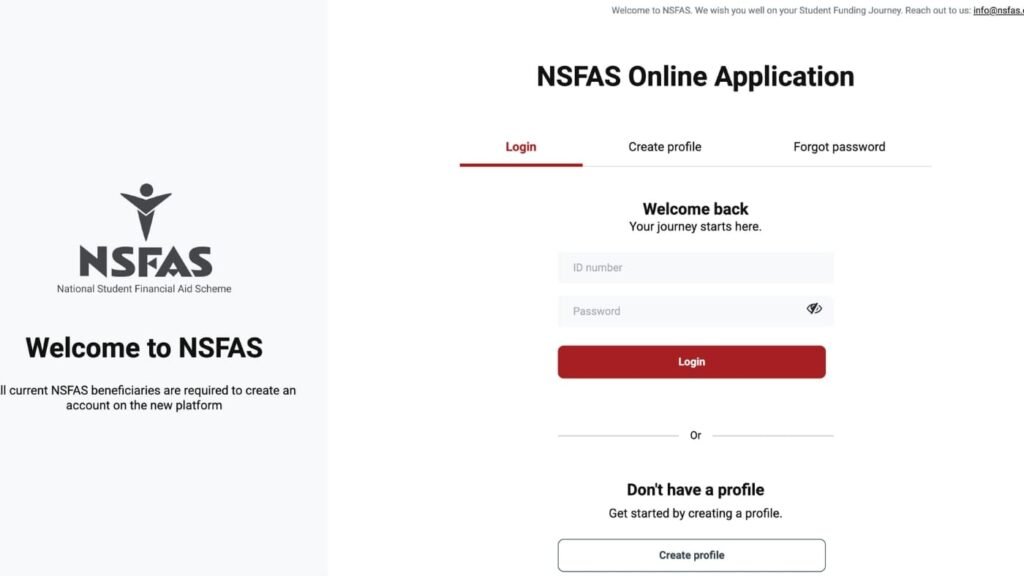
How to Login MyNSFAS Account: Step-by-step Guide.
Follow these steps carefully to complete a successful NSFAS account login.
Step 1: Go to the Official myNSFAS Portal
Open your internet browser and visit the official NSFAS website.
Click on myNSFAS to access the login page.
Always ensure you are on the official NSFAS platform to avoid scams.
Step 2: Click on “Login”
On the myNSFAS homepage, select the Login option.
This will take you to the NSFAS account login screen.
Step 3: Enter Your Login Details
You will need:
- Your South African ID number or username
- Your myNSFAS password
Make sure there are no typing errors, extra spaces, or incorrect characters.
Step 4: Complete Security Verification (If Prompted)
Sometimes NSFAS may ask you to:
- Enter a one-time PIN (OTP)
- Verify your identity via email or SMS
This is a security measure to protect your account.
Step 5: Access Your myNSFAS Dashboard
Once logged in successfully, you can:
- Check your NSFAS application status
- Upload or view documents
- See funding decisions
- Track allowances
- Update personal information
Documents Needed
Although logging in does not always require documents, you may need them once inside your myNSFAS account.
Commonly Required Documents
These may include:
- Certified copy of your South African ID
- Certified copies of parent or guardian IDs
- Proof of household income
- SASSA grant letter (if applicable)
- Death certificates (for orphans)
- Disability annexure (if applicable)
Certification Rules Explained
- Documents must be certified by a commissioner of oaths
- Certification should not be older than a few months
- Copies must be clear and readable
File Formats and Upload Tips
When uploading documents to your NSFAS account:
- Use PDF or clear image formats
- Avoid blurry photos
- Ensure files are not too large
- Name files clearly to avoid confusion
Common Problems and Solutions
Many students experience issues when trying to login to their myNSFAS account.
Forgot myNSFAS Password
If you forgot your password:
- Click on Forgot Password
- Enter your ID number
- Follow the reset instructions sent via SMS or email
Make sure your contact details are still active.
NSFAS Account Locked
Your account may be locked if:
- You enter the wrong password too many times
- Suspicious activity is detected
Solution:
- Wait a few hours and try again
- Reset your password
- Contact NSFAS support if the issue continues
myNSFAS Login Page Not Loading
This often happens during peak periods.
Try:
- Using a different browser
- Clearing cache and cookies
- Logging in late at night or early morning
- Using a stable internet connection
Incorrect ID or Username Error
Ensure that:
- You are using the same ID used during registration
- You are not creating a duplicate account
Duplicate accounts can delay your NSFAS application.
Important Tips and Warnings
Logging into your NSFAS account safely is just as important as accessing it.
Avoid NSFAS Scams
Never:
- Share your password
- Pay anyone to “fix” your NSFAS login
- Click on suspicious links claiming to be NSFAS
NSFAS services are free.
Watch Important Deadlines
Even if you can login, missing deadlines can result in:
- Application rejection
- Loss of funding
- Delayed allowances
Check your myNSFAS account regularly.
Mistakes That Lead to Problems
Common mistakes include:
- Using someone else’s ID
- Uploading uncertified documents
- Creating multiple accounts
- Ignoring NSFAS messages
Always read notifications inside your account.
Frequently Asked Questions (FAQ)
Can I login to myNSFAS account without applying?
Yes. If you already created an account previously, you can login even if applications are closed.
What should I do if my NSFAS status does not change?
Log in regularly and check notifications. Processing can take time, especially during high-volume periods.
Can parents login to myNSFAS account?
Parents can assist, but the account must be in the student’s name and linked to the student’s ID.
Is myNSFAS login the same for TVET and university students?
Yes. The same myNSFAS account login system is used for both.
Can I login using my phone?
Yes. The myNSFAS portal is mobile-friendly, but ensure a stable internet connection.
Conclusion
Knowing how to login myNSFAS account gives you control over your funding, your application, and your academic future. Your myNSFAS account is the centre of all communication between you and NSFAS.
If you are struggling to access your account, do not panic. Most login issues can be resolved by resetting your password, checking your details, or trying again during off-peak hours.
Stay alert, keep your information safe, and check your NSFAS account regularly. Taking responsibility for your myNSFAS account is one of the most important steps toward securing and maintaining NSFAS funding.
Check these also:
1. How to Create myNSFAS Account Online
2. How to Create NSFAS Account
3. How to Apply for NSFAS Online 2026