
How to reset MyNSFAS account password: The Complete Guide for 2026. Being locked out of your funding portal can derail your entire academic year.
This definitive guide on How To Reset MyNSFAS Account Password provides the exact steps to regain instant access to your financial aid portal. The NSFAS (National Student Financial Aid Scheme) online system is your central hub for managing your bursary, from application to allowance disbursement.
When you forget your password, you cannot check your application status, sign your bursary agreement, or update your personal details. This matters because missing critical deadlines or communications due to a login issue can jeopardize your funding.
This guide ensures you can perform a secure NSFAS account password reset quickly, getting you back on track with your studies.
What is a MyNSFAS Account Password Reset and Why It’s Crucial
A MyNSFAS account password reset is the official, secure process provided by the National Student Financial Aid Scheme. It allows you to create a new password when you have forgotten your current one or when your account has been locked for security reasons.
This process is for any student or parent who can no longer access their myNSFAS account due to a lost or forgotten password. It is a lifeline when the standard login fails.
This guide covers everything from the pre-requisites you need before starting, to the step-by-step NSFAS password reset procedure via email and SMS. It also addresses the common errors students face and how to overcome them, ensuring you can reclaim control of your account.
Who This Topic Applies To
The need for a password reset is universal across all NSFAS user groups. This guide is essential for:
- First-Time Applicants: If you created your account during a previous cycle or earlier in the year and have now forgotten your password as the application window opens.
- Returning NSFAS Students: Funded students must log in each academic year to sign their NSFAS Bursary Agreement. A forgotten password can delay this mandatory step, potentially affecting your funding continuity.
- TVET College vs. University Students: The password reset function is identical on the central NSFAS portal, regardless of whether you are studying at a TVET college or a public university.
- SASSA Grant Beneficiaries: While your financial eligibility is automatically confirmed, you still need full portal access to manage your application and funding. The reset process is the same.
- Students with Disabilities: The process is equally applicable. If you require alternative assistance, the core reset steps remain the first point of action before seeking additional support.
Requirements and Eligibility for a MyNSFAS Password Reset
Eligibility to reset your password is straightforward: you must be a registered user of the myNSFAS portal. The system does not distinguish between applicant types for this function. However, you must have the following to succeed:
- A Registered and Accessible Email Address: This is the email you used as your MyNSFAS username. The password reset link will be sent here. You must be able to access this inbox.
- Access to Your Registered Cellphone Number: Your South African number is used for identity verification via One-Time Pin (OTP). You must have the phone in your possession to receive the SMS.
- Your Correct ID Number: You will need to input this accurately during the process for verification.
- A Stable Internet Connection: Required to load the NSFAS website and access your email without interruption.
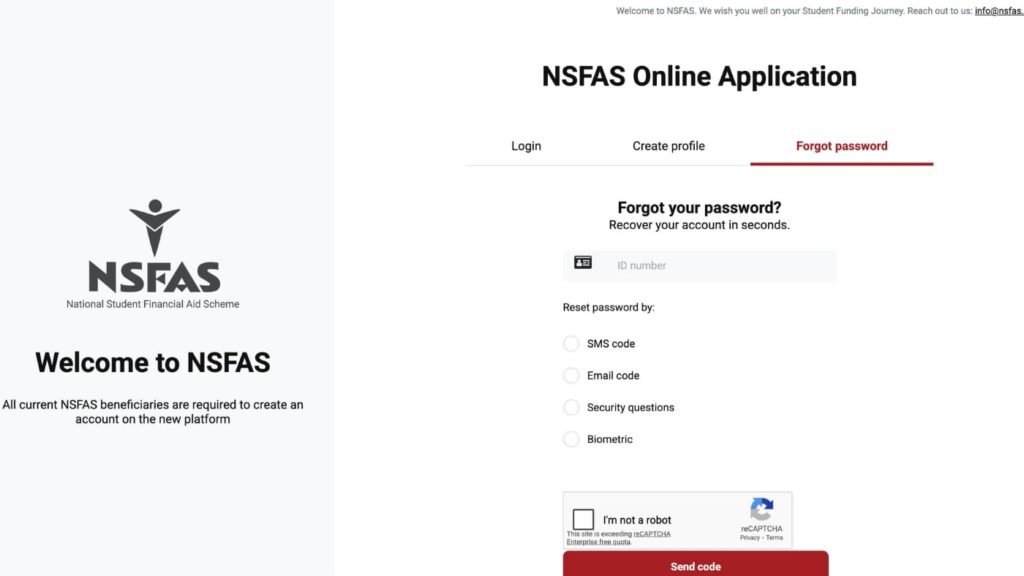
How To Reset MyNSFAS Account Password: Step-by-Step Process
Follow these clear, numbered steps to securely reset your password and regain access to your account.
- Go to the Official NSFAS Website. Open your internet browser and navigate to www.my.nsfas.org.za. This is the only website you should use for this process to avoid scams.
- Click on the ‘myNSFAS’ Tab. On the homepage, find and click the ‘myNSFAS’ button, usually at the top right of the screen. This will take you to the login portal.
- Click ‘Forgot your password?’ On the login page, directly below the fields where you would enter your username and password, you will see this link. Click on it to begin the NSFAS account password reset.
- Enter Your Username/Email Address. A new screen will appear. Carefully type in the email address that serves as your MyNSFAS account username. Double-check for typos.
- Verify Your Identity via OTP. Click ‘Submit’. The system will send a One-Time Pin (OTP) to the cellphone number linked to your account. Retrieve this 6-digit code from your SMS.
- Enter the OTP and Proceed. Type the OTP into the verification field on the NSFAS website. This confirms you are the legitimate account holder.
- Check Your Email for the Reset Link. After OTP verification, NSFAS will send a secure password reset link to your registered email address. Open your email inbox (check Spam/Junk folders) and find this email.
- Click the Link and Create a New Password. Clicking the link will open a page where you can set a new password. Create a strong, unique password. Re-enter it to confirm.
- Confirm the Change and Log In. Once you click ‘Submit’ or ‘Change Password’, you will receive a confirmation. Return to the main myNSFAS login page and enter your username (email) with your new password.
What You Need to Reset Your MyNSFAS Account Password
You do not need physical documents, but you must have access to key digital information. Have these ready:
- Your myNSFAS Username: This is your registered email address. You must know which email you used.
- Your Registered Cellphone Number: The phone that receives the SMS OTP must be accessible.
- Your South African ID Number: Needed to verify your identity within the system.
- Access to Your Email Inbox: You must be able to log into the email account to retrieve the reset link.
Common Problems and Solutions in Resetting Your Password
Students often encounter specific technical hurdles. Here are the most common issues and practical fixes.
- Problem: “The OTP is not arriving on my phone.”
- Solution: Ensure your phone has signal and is not on airplane mode. Wait 5-10 minutes and request a new OTP. Verify that the number you are using is the one originally linked to your myNSFAS account. If you have a new number, you must contact NSFAS to update it first.
- Problem: “The password reset email is not in my inbox.”
- Solution: This is the most common issue. First, check your Spam, Junk, Promotions, and Trash folders meticulously. The email may be filtered there. Wait up to 30 minutes for delays. Ensure you entered the correct email address.
- Problem: “Error: User not found” after entering my email.
- Solution: This means the email you entered does not match any myNSFAS account on record. Try every email address you own. You may have used a different one. If sure, you may need to recover your username first.
- Problem: “Your account is locked. Contact administrator.”
- Solution: This occurs after too many failed login or reset attempts. For security, you cannot self-serve. You must contact the NSFAS call centre at 08000 67327 or visit a NYDA office for them to manually unlock your account.
- Problem: The reset link says “expired” or doesn’t work.
- Solution: Reset links are time-sensitive for security, often expiring within an hour. You must restart the entire ‘Forgot your password’ process from the beginning to generate a brand new, active link.
Important Tips and Warnings for a Secure Reset
- Beware of Phishing Scams (Most Important Warning): NSFAS will NEVER ask for your OTP, ID, or password via a phone call, WhatsApp, or a separate email. Only enter your details on the official www.nsfas.org.za website. Do not click password reset links from SMS or social media.
- Reset Well Before Deadlines: Do not wait until the day an application or agreement signing closes to try and reset your password. System traffic is high, and delays can occur. Act as soon as you realize there’s an issue.
- Create a Strong New Password: When setting your new password, make it strong. Use a combination of uppercase letters, lowercase letters, numbers, and symbols. Avoid obvious choices like your name or birth date.
- Update Your Contact Details After Logging In: Once you successfully reset and log in, immediately go to your profile section. Confirm your email and cellphone number are correct to avoid future access problems.
- Never Share Your OTP with Anyone: The OTP is the final key to your account. Any person claiming to be from NSFAS who asks for this OTP is attempting to scam you and steal your account.
Frequently Asked Questions (FAQ)
Q: Can I reset my NSFAS password without my old phone number?
A: It is extremely difficult. The registered number is a primary security tool. If you no longer have that number, you will likely need to contact the NSFAS call centre for identity verification using alternative methods to update your contact details first.
Q: I clicked ‘Forgot Password’ but I’m not getting any email or SMS. What do I do?
A: Follow a checklist: 1) Check Spam/Junk folders. 2) Ensure phone has signal. 3) Verify you are using the correct, original email address. 4) Wait 30 minutes. 5) Try again during off-peak hours (evening/weekend). If all fails, contact NSFAS.
Q: Is the password reset process different for TVET college students?
A: No. The myNSFAS portal is a single national system. The NSFAS password reset process is exactly the same for all students at public universities and TVET colleges.
Q: How long does the password reset link from NSFAS stay valid?
A: Typically, these secure links expire between 60 minutes to 24 hours after being sent. For your security, use the link immediately.
Q: What is the official NSFAS contact number if I cannot reset my password myself?
A: The official NSFAS contact centre number is 08000 67327. Have your ID number ready. You can also visit a National Youth Development Agency (NYDA) office for in-person help.
Q: Should I just create a new myNSFAS account if I can’t reset the password?
A: Absolutely not. Creating a second account will cause severe system conflicts. Your ID number is permanently linked to your first account, leading to application rejection, funding delays, and administrative chaos. You must recover the original account.
Conclusion.
Forgetting your myNSFAS account password is a common and fixable problem. This guide has provided you with the complete, secure roadmap for a successful MyNSFAS account password reset. You have the knowledge to navigate the process, troubleshoot errors, and protect yourself from scams.
Do not let a lost password create unnecessary anxiety or risk your funding. Approach the reset methodically, using the steps outlined here. Regaining access is your right as an applicant or bursary holder. Take action today—log in, confirm your details, and continue confidently managing your journey toward academic success with NSFAS by your side.
1. How to Recover MyNSFAS Username and Password
2. MyNSFAS Login for South African Students
3. How to Login MyNSFAS Account – Complete Guide
4. How to Create myNSFAS Account Online
5. How to Apply for NSFAS Online (Step-by-Step)