How to Track NSFAS Application Online: Your Complete 2026 Guide. The National Student Financial Aid Scheme (NSFAS) is the life-changing bursary that funds tertiary education for students from poor and working-class South African families. After you hit “submit” on your application, the waiting period can be filled with anxiety.
This is where knowing how to track NSFAS application online becomes your most powerful tool.
Learning to track your application matters because it moves you from a state of uncertainty to a position of control and clarity. It allows you to see real-time updates, know if NSFAS needs more documents from you, and ultimately, discover if your funding for university or TVET college has been approved. This definitive 2026 guide will walk you through every step, status meaning, and solution.
What Is NSFAS Application Tracking Online and Why It Matters
NSFAS application tracking online is the process of using the official myNSFAS portal to monitor the progress of your funding application from the moment you submit it until a final decision is made. It is a dynamic system that provides specific status updates at each stage of NSFAS’s evaluation.
Who NSFAS Application Tracking Online Is For
This process is essential for:
- First-time applicants waiting for their first-ever funding decision.
- Returning students checking if they meet academic progression requirements for continued funding.
- Any student who needs to confirm receipt of documents or provide additional information.
- Parents and guardians supporting an applicant through the process.
What NSFAS Application Tracking Online Covers
Tracking your application gives you visibility over the entire evaluation pipeline:
- Confirmation of Submission: Proof your application was received.
- Financial Eligibility Check: Whether your household income falls within the threshold.
- Academic Eligibility Check: Coordination with your institution on your admission status.
- Final Decision: Notification of approval, rejection, or a request for an appeal.
- Post-Approval Steps: Instructions to sign your NSFAS Bursary Agreement (NBA) and later, tracking of allowance payments.
Who This Topic Applies To
Understanding how to track your NSFAS application is critical for a wide audience:
- First-Time Applicants: Grade 12 learners and out-of-school youth applying for the 2026 academic year.
- Returning NSFAS Beneficiaries: University or TVET college students who received funding before and must be cleared for the next year of study.
- TVET College Applicants: Students pursuing vocational qualifications at Technical and Vocational Education and Training colleges.
- University Applicants: Students enrolled in or applying for undergraduate studies at any South African public university.
- SASSA Grant Beneficiaries: While financially auto-qualified, these students must still track their application to ensure academic admission is confirmed and their funding is activated.
Requirements and Eligibility for Tracking
To track an application, you must have first applied. Therefore, meeting the core NSFAS eligibility criteria is the foundation.
Citizenship
You must be a South African citizen or permanent resident. Your status in the tracking portal will reflect verification against the Department of Home Affairs database.
Household Income Thresholds
Your application is means-tested. The 2026 thresholds are expected to remain:
- Up to R350,000 per annum total household income for students with disabilities.
- Up to R600,000 per annum total household income for all other students.
The “Financial Eligibility” status reflects the outcome of this check.
Academic Requirements (Where Applicable)
- New Applicants: Must have a Grade 12 certificate and an acceptance offer from a public institution. Your tracking status will show “Awaiting Academic Results/Admission” until this is confirmed.
- Returning Students: Must pass at least 50% of their modules and comply with the N+ rule. Your continued funding status depends on this.
Special Cases
Students who are orphans, from child-headed households, or have a disability should have submitted supporting documents. Tracking helps ensure these documents have been received and processed correctly.
How to Track NSFAS Application – Step-by-Step Process
Follow this clear, beginner-friendly guide to navigate the myNSFAS portal with confidence.
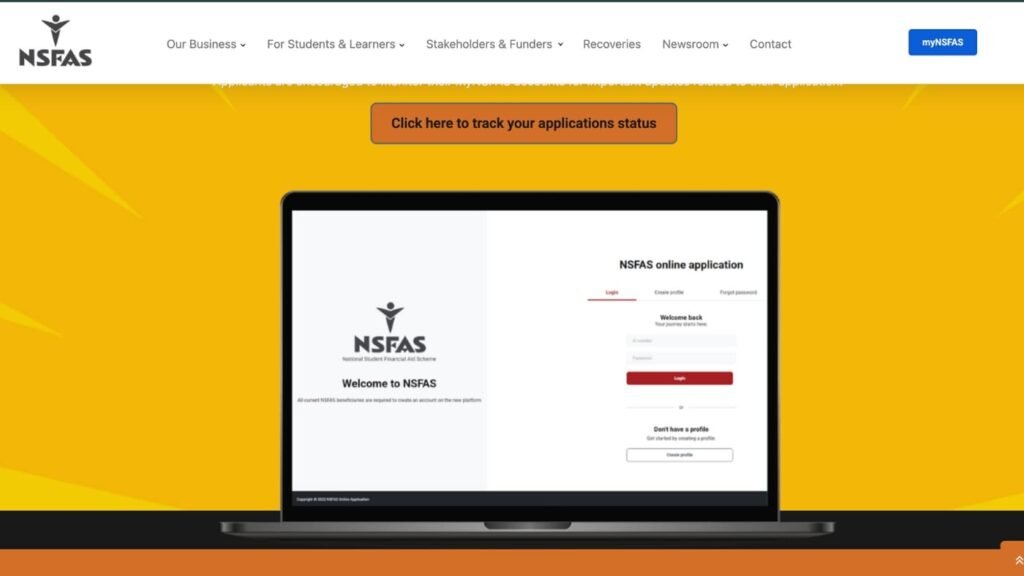
Step 1: Access the Official myNSFAS Portal
Open your web browser and go to the official NSFAS website. Locate and click on the ‘myNSFAS‘ button. This is the only legitimate portal for tracking.
Step 2: Log Into Your Account
Enter the username and password you created during your application. If you forgot these details, use the “Forgot Password” or “Forgot Username” links on the login page to recover them.
Step 3: Navigate to the Tracking Section
Once logged into your dashboard, look for a tab or button labelled “Track Funding Progress” or “Check Application Status.” Click on it to view your detailed status.
Step 4: Interpret Your Application Status
Your current status will be displayed prominently. Understand what it means (see the comprehensive breakdown in the next section). This status is your application’s heartbeat.
Step 5: Take Any Required Action
Your status may require action. For example:
- “Application Submitted”: No action needed; wait for updates.
- “Missing Documents”: Upload the required certified documents immediately.
- “Approved”: Sign your NSFAS Bursary Agreement (NBA) without delay.
Step 6: Check Regularly (But Not Obsessively)
Log in once a week for updates. Statuses are updated in batches by NSFAS, not in real-time. Avoid checking multiple times a day.
Understanding Your NSFAS Tracking Status Meanings
Each status update is a specific message. Here is what they truly mean for your application.
“Application Submitted”
Your application has been successfully received by the NSFAS system. It is in the queue for initial processing. Ensure all required documents were attached.
“Filtering”
NSFAS is conducting initial verification checks. They are comparing your provided information (ID, household income) against government databases like SARS and DHET.
“Funding Eligibility”
A critical milestone. This means you have PASSED the financial means test. Your household income is within the threshold. NSFAS is now waiting to confirm you are academically admitted to a funded programme at your chosen institution.
“Awaiting Academic Results / Admission”
NSFAS has sent a query to your university or TVET college. They are waiting for your final Grade 12 results or confirmation of your registration for the academic year. This is a common point of delay. Contact your institution’s financial aid office if this status persists.
“Provisionally Funded”
You are conditionally approved, pending your final Grade 12 results meeting the minimum entry requirements for your chosen course.
“Approved”
Congratulations! Your funding has been officially granted. The most important next step is to sign your NSFAS Bursary Agreement (NBA) electronically on the portal. Your funding is not final until this is done.
“Awaiting Registration”
Your academic admission is confirmed. NSFAS is now waiting for your institution to submit your official registration data so they can disburse your allowances.
“Unsuccessful / Rejected”
Your application did not meet all criteria. A reason will be provided (e.g., “Household income exceeds threshold,” “Academic admission not confirmed”). You have the right to appeal during the official appeal window.
Documents Needed for Tracking-Related Actions
Often, tracking reveals you need to submit documents. Here is your checklist.
List of Commonly Requested Documents
- Certified Copy of Your ID: A clear, recently certified copy of your green barcoded ID, smart ID card, or birth certificate (if under 16).
- Proof of Parents/Guardian/Spouse Income: Latest payslips, employment letters, SASSA grant confirmation, or sworn affidavits if unemployed.
- Consent Form: The downloadable form must be fully completed and signed by all parties whose income was declared.
- Academic Proof: Final Grade 12 results, tertiary academic transcript (for returning students), or admission letter.
- Special Case Documents: Disability Annexure A form, death certificates, court orders, etc.
Certification Rules
Any document uploaded must be a certified copy. Certification must:
- Be done by a Commissioner of Oaths, police station, or post office.
- State “Certified true copy of the original.”
- Include the official’s signature, stamp, and date (within the last 3 months).
File Formats and Upload Tips
- Scan documents in a clear, well-lit area. Use PDF, JPEG, or PNG formats.
- Keep file sizes reasonable (under 2MB each).
- Use clear filenames: “Surname_ID_DocumentType.pdf”.
- Always preview the upload before finalising to ensure everything is legible.
Common Problems and Solutions in Application Tracking
You might encounter these hurdles. Here is how to overcome them.
Cannot Log Into myNSFAS Account
- Problem: “Invalid username/password” error.
- Solution: Use the “Forgot Password” function. If you no longer have access to the registered email/cellphone, you must contact the NSFAS call centre (08000 67327) to update your details. Do not create a second account.
Status Stuck on “Awaiting Academic Results/Admission”
- Problem: No movement for weeks after receiving an admission offer.
- Solution: This delay is usually at the institution. Contact your university or TVET college’s Financial Aid Office directly. Provide your student number and ID. Ask them to confirm they have submitted your registration data to NSFAS.
Status is “Unsuccessful” – Want to Appeal
- Problem: You believe the rejection reason is incorrect.
- Solution: Wait for the official appeal period to be announced (typically after the main application cycle). Log into your myNSFAS portal, find the appeal section, and submit a formal appeal with a letter and correct supporting documents.
“Missing Documents” Status
- Problem: You uploaded documents but the status still says they are missing.
- Solution: The uploaded files may be unclear, uncertified, or in the wrong format. Delete the old uploads and submit new, perfectly clear, certified copies. Ensure the Consent Form is fully signed.
No Status Update for a Long Time
- Problem: Application shows “Submitted” for months.
- Solution: Check NSFAS’s official social media (@myNSFAS) for announcements on system delays. If there are none, submit a query via the “Contact Us” form on the portal. Be patient during peak processing times.
Important Tips and Warnings
Avoiding Scams
- NSFAS will never ask for your password, OTP, or banking details via email, WhatsApp, or phone call.
- There are no “NSFAS agents” who can speed up your application for a fee. Anyone claiming this is a scammer.
- Only use the official myNSFAS portal. Do not enter your login details on any other website.
Deadlines to Watch
- Application Closing Date: Apply as soon as the window opens (usually around August/September). Do not wait until the January deadline.
- Appeal Window: If rejected, you typically have 30 days to appeal once it opens. Mark this date.
- Agreement Signing Deadline: If approved, sign your NBA immediately. Missing this deadline can result in your funding being withdrawn.
Mistakes That Lead to Rejection or Delays
- Creating multiple myNSFAS accounts. This confuses the system and can lock your application.
- Submitting uncertified or blurry documents.
- Ignoring a request for additional information.
- Not signing your NSFAS Bursary Agreement after approval.
- Failing to meet academic progression rules as a returning student.
Frequently Asked Questions (FAQ)
Q: How often does the NSFAS tracking status update?
A: Statuses are updated in batches as applications move through different departments. Check once a week. Significant updates (like approval) may trigger an SMS notification.
Q: Can I track my NSFAS application without a myNSFAS account?
A: No. The myNSFAS account is the only secure, official portal for detailed tracking. The WhatsApp chatbot can give only a very basic status (e.g., successful/pending), not the detailed stages.
Q: My status says “Funding Eligibility.” Am I approved?
A: Not yet. This is a positive step, but it only means you passed the financial test. You are still awaiting confirmation of academic admission from your institution.
Q: Who do I contact if my tracking status seems wrong or stuck?
A: First, use the query function in your myNSFAS portal. For statuses related to academic admission, contact your institution’s financial aid office. For systemic issues, you can try the NSFAS call centre or their official social media for guidance.
Q: I am a returning student. What status should I look for?
A: You should see a status confirming your continued eligibility based on your academic performance. If you met the progression rules, your status should eventually move to “Approved” for the new academic year.
Q: What does “NSFAS Bursary Agreement” mean on the portal?
A: This is the legal contract that outlines the terms of your bursary. You MUST sign this online through the portal to accept the funding and allow NSFAS to disburse your money. It is the final step after approval.
Conclusion:
Tracking your NSFAS application online is an active and empowering part of your funding journey. By mastering the myNSFAS portal, you take control, reduce anxiety, and ensure you never miss a critical request or deadline.
Remember, patience and accuracy are your best allies. Apply early, submit perfect documents, check your status weekly, and act immediately on any requests. Your dedication to this process is the first step in securing an investment that will transform your future. Log in, track your progress, and move confidently toward your educational goals.
Check also:
1. How to Check NSFAS Status Online in – A Complete Guide
2. How to Login MyNSFAS Account – Complete Guide
3. How to Apply for NSFAS Online (Step-by-Step)
1 comment
I do what to apple for NSFAS now