How to create myNSFAS Account Online. Creating myNSFAS account online is the first and most important step for any South African student who wants to apply for funding from the National Student Financial Aid Scheme (NSFAS). Without a myNSFAS account, you cannot submit an NSFAS application, upload documents, track your funding status, or receive official communication from NSFAS.
This guide explains how to create a myNSFAS account online step by step, why it matters, who qualifies, what you need before you start, and common problems students face during registration. Whether you are a Grade 12 learner, a first-year student, a returning student, or a parent helping a child, this article provides clear and practical guidance.
What Is NSFAS and Why It Matters
The National Student Financial Aid Scheme (NSFAS) is a South African government bursary programme under the Department of Higher Education and Training. Its role is to provide financial assistance to students from poor and working-class households so they can access higher education.
NSFAS matters because many students who qualify academically cannot afford tuition fees, accommodation, or study materials. NSFAS funding bridges this gap and allows students to focus on their studies rather than financial stress.
Who NSFAS Is For
NSFAS is designed for:
- South African citizens and permanent residents
- Students studying or intending to study at public universities
- Students enrolled or planning to enrol at public TVET colleges
- Students from households earning R350,000 or less per year
- SASSA grant beneficiaries who meet academic requirements
What NSFAS Covers Financially
If approved, NSFAS funding may include:
- Tuition fees
- Accommodation (within approved limits)
- Study materials and textbooks
- Living allowances
- Transport allowances for qualifying students
To access these benefits, you must first create a myNSFAS account online.
Who This Topic Applies To
Understanding whether you need to create a myNSFAS account helps avoid unnecessary confusion.
First-Time NSFAS Applicants
If you have never applied for NSFAS before, you must create a myNSFAS account to start your application.
Returning NSFAS Applicants
Students who applied in previous years may already have an account. If you cannot remember your login details, you should recover your account rather than creating a new one.
TVET College vs University Students
Both TVET college students and university students use the same myNSFAS system. However, the academic details and funding rules may differ slightly depending on the institution.
SASSA Grant Beneficiaries
SASSA grant beneficiaries must also create a myNSFAS account. While they are financially pre-qualified, registration and application are still mandatory.
Requirements and Eligibility to Create a myNSFAS Account
Before starting the registration process, make sure you meet the basic requirements.
Citizenship Requirements
You must be:
- A South African citizen, or
- A permanent resident of South Africa
International students do not qualify for NSFAS funding.
Household Income Thresholds
Household income requirements apply during the application stage:
- R350,000 or less per year for most applicants
- R600,000 or less per year for students with disabilities
Academic Status
You can create a myNSFAS account even if:
- You are still in Grade 12
- You have not yet been accepted by an institution
Academic eligibility is assessed later during the application process.
Special Cases
Students who are:
- Orphans
- From child-headed households
- Living with disabilities
May be required to upload additional documents during application, but account creation remains the same.
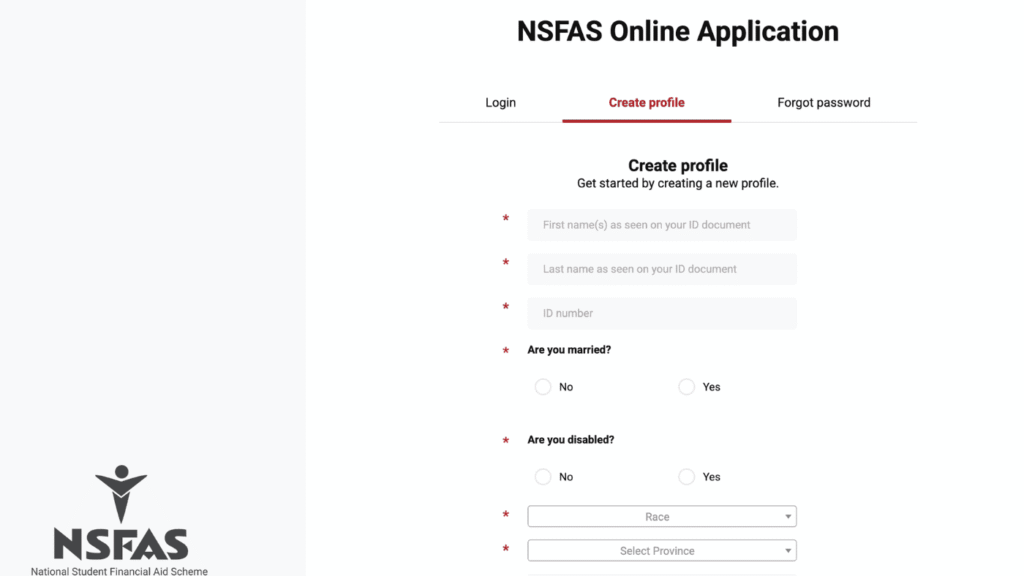
How to Create myNSFAS Account Online 2026: Step-by-Step Process
Follow these steps carefully to successfully create your myNSFAS account online.
Step 1: Prepare Your Information
Before visiting the NSFAS website, ensure you have:
- Your valid South African ID number
- A working cellphone number (registered in your name if possible)
- A valid email address you can access easily
These details are critical for verification and communication.
Step 2: Visit the Official NSFAS Website
Open your web browser and go to the official NSFAS website. Always ensure you are using the correct site to avoid scams pretending to be NSFAS.
Step 3: Click on “myNSFAS”
On the NSFAS homepage, select the myNSFAS option. This will take you to the login and registration portal.
Step 4: Choose “Register”
If you do not already have an account, select the Register option to begin the account creation process.
Step 5: Enter Your South African ID Number
You will be asked to enter your 13-digit South African ID number.
Make sure:
- The ID number is correct
- It belongs to you
- You have not previously registered using the same ID
If the system indicates that your ID already exists, you should recover your account instead of registering again.
Step 6: Provide Personal Details
Complete your personal information exactly as it appears on your ID document, including:
- Full names and surname
- Date of birth
- Gender
Any mismatch can cause verification issues later.
Step 7: Create Your Username and Password
This step secures your account.
Username Guidelines
- Choose a unique username
- Avoid using sensitive personal information
Password Requirements
Your password must usually:
- Be at least 8 characters long
- Include uppercase and lowercase letters
- Include numbers
- Include a special character
Write your password down and keep it safe.
Step 8: Enter Contact Details
You must provide:
- A valid email address
- An active cellphone number
NSFAS will use these details to send:
- One-Time Pins (OTPs)
- Application updates
- NSFAS status notifications
Step 9: Accept Terms and Conditions
Read the NSFAS terms and conditions carefully. Confirm that:
- All information you provided is accurate
- You understand your responsibilities as an applicant
Accepting false information may result in disqualification.
Step 10: Verify Your Account Using OTP
NSFAS will send an OTP to your cellphone number or email address.
Enter the OTP correctly to complete your registration. Once verified, your myNSFAS account will be successfully created.
Documents Needed After Creating a myNSFAS Account
You do not upload documents during registration, but you will need them when applying for NSFAS funding.
Commonly Required Documents
These may include:
- Certified copy of your South African ID
- Certified copy of parent or guardian ID
- Proof of household income or affidavit if unemployed
- SASSA grant letter (if applicable)
- Signed NSFAS consent form
- Proof of disability (if applicable)
- Death certificate(s) if parents are deceased
Certification Rules
- Documents must be certified
- Certification should not be older than three months
- Stamps and signatures must be visible
File Formats and Upload Tips
- Accepted formats usually include PDF, JPG, or PNG
- Ensure documents are clear and readable
- Avoid blurry photos or cropped pages
Common Problems and Solutions
Many students experience issues when creating a myNSFAS account. Most can be resolved easily.
ID Number Already Exists
This means:
- You previously registered, or
- Someone registered on your behalf
Solution:
- Use the “Forgot Password” option
- Recover your account instead of creating a new one
OTP Not Received
This can happen due to:
- Network delays
- Incorrect contact details
- System congestion
Solution:
- Wait a few minutes and request another OTP
- Check your spam or junk folder
- Confirm your phone number and email are correct
Website Not Loading
The NSFAS website may be slow during peak application periods.
Solution:
- Try again later at night or early morning
- Use a different browser or device
- Clear your browser cache
Important Tips and Warnings
Following these tips can help you avoid unnecessary problems.
Avoiding NSFAS Scams
- Creating a myNSFAS account is free
- Do not pay anyone to register or apply for you
- Never share your password or OTP with anyone
Deadlines to Watch
While account creation can be done anytime, NSFAS applications are only accepted during official application periods. Creating your account early helps you apply as soon as applications open.
Mistakes That Lead to Problems
- Creating multiple accounts
- Using someone else’s contact details
- Entering incorrect ID information
- Ignoring verification messages
Always double-check your information before submitting.
Frequently Asked Questions (FAQ)
Can I Create a myNSFAS Account Without Applying?
Yes. You can create a myNSFAS account even if applications are not yet open.
Can Grade 12 Learners Create a myNSFAS Account?
Yes. Grade 12 learners are encouraged to create accounts early.
Is Creating a myNSFAS Account Free?
Yes. NSFAS does not charge any fees for account creation or applications.
Can I Change My Details After Registration?
Some details can be updated after logging into your myNSFAS account, but core identity details may require support assistance.
How Do I Check My NSFAS Status After Registration?
After applying for funding, you can do an NSFAS status check by logging into your myNSFAS account.
Conclusion
Creating a myNSFAS account online is a simple but essential step for students seeking financial assistance for higher education in South Africa. Without this account, you cannot apply for NSFAS funding, track your application, or receive important updates.
The key is to register early, use accurate personal details, protect your login information, and prepare your documents in advance. By following this guide carefully, you place yourself in a strong position to successfully apply for NSFAS funding and take the next step in your education journey.
If you qualify for NSFAS, do not delay. Create your myNSFAS account online and be ready when applications open.
Check these also:
1. How to Apply for NSFAS Online
2. How to Create NSFAS Account