
How to Reapply for NSFAS Online: Complete Guide 2026. Understanding how to reapply for NSFAS online is a critical skill for thousands of South African students seeking government-funded tertiary education.
This comprehensive guide provides the exact process, documents, and strategies you need to successfully submit your National Student Financial Aid Scheme (NSFAS) reapplication for the 2026 academic cycle.
A reapplication is necessary for returning students who need continued funding, as well as for first-time applicants who were previously unsuccessful or missed the initial deadline. Knowing how to navigate the official myNSFAS account portal correctly can mean the difference between securing your funding for the coming year or facing financial exclusion from your studies.
This matters because your education and future career should not be halted by a missed deadline or a simple procedural error.
How to Reapply for NSFAS Online and Why It Matters
Reapplying for NSFAS online is the formal process of submitting a new funding application for an upcoming academic year. It is not simply renewing or updating an old application; it is treated as a fresh application assessed against the latest eligibility criteria.
This process is crucial because NSFAS does not automatically continue funding from one year to the next. Even if you were funded this year, you must reapply for NSFAS to be considered for next year. A successful reapplication secures the full cost of study package, which includes:
- Tuition and registration fees paid directly to your institution.
- A learning materials allowance.
- A personal care allowance.
- Accommodation costs (either in a university residence or a private accredited allowance).
- Transport allowances where applicable.
Mastering the online reapplication ensures you maintain this vital financial support throughout your qualification.
Who This Topic Applies To
This guide is essential for a specific group of students and applicants:
- Returning NSFAS Students: This is the primary group. If you are currently funded by NSFAS in 2025 and plan to continue studying in 2026, you must reapply. Funding is not automatic.
- Previous Applicants Who Were Rejected: If your application for 2025 was unsuccessful, you have the opportunity to reapply for NSFAS online for 2026, especially if your household or academic circumstances have improved.
- First-Time Applicants Who Missed the Deadline: If you are a Grade 12 learner or a new student who missed the main application window, the reapplication period (if opened) is your second chance.
- TVET College and University Students: The reapplication process is fundamentally the same for students at Technical and Vocational Education and Training (TVET) colleges and public universities.
- SASSA Grant Beneficiaries: While often automatically eligible, students from SASSA-grant households must still complete the reapplication process to confirm their continued eligibility and update their details.
Requirements and Eligibility for NSFAS Reapplication
Eligibility for reapplication is grounded in the core NSFAS requirements. To have your reapplication considered, you must meet these criteria:
- South African Citizenship: You must be a South African citizen or permanent resident (specific conditions apply).
- Financial Eligibility: Your combined annual household income must not exceed the threshold set for that year (e.g., R350,000 per annum for most students, or R600,000 for students with disabilities).
- Academic Eligibility:
- For Returning Students: You must meet the N+ Rule for your specific qualification. This means you must not have exceeded the minimum time allocated for your degree/diploma plus one additional year of funding.
- For First-Time University Students: You must have passed Grade 12 and been accepted or provisionally accepted to study at a public university.
- For First-Time TVET Students: You must have passed Grade 9 and been accepted or provisionally accepted at a public TVET college.
- Institutional Eligibility: You must be planning to study or continuing to study at a public South African university or TVET college.
- No Existing Qualifications: You must not already hold a completed tertiary qualification (unless applying for a funded PGCE, which has specific rules).
How to Reapply for NSFAS Online – Step-by-Step Process
Follow this beginner-friendly, numbered guide to ensure you don’t miss a step. The entire process is completed on the NSFAS website.
Step 1: Prepare Your Details and Documents
Before you even log in, gather all the information you’ll need. This includes your own ID number, your parents’/guardians’/spouse’s ID numbers, their contact details and employment info, and all the necessary supporting documents (listed in the next section).
Step 2: Access the Official NSFAS Website
Open your web browser and go to the official NSFAS portal: www.nsfas.org.za. Never use links from social media ads or emails. Type the address directly or use a trusted bookmark.
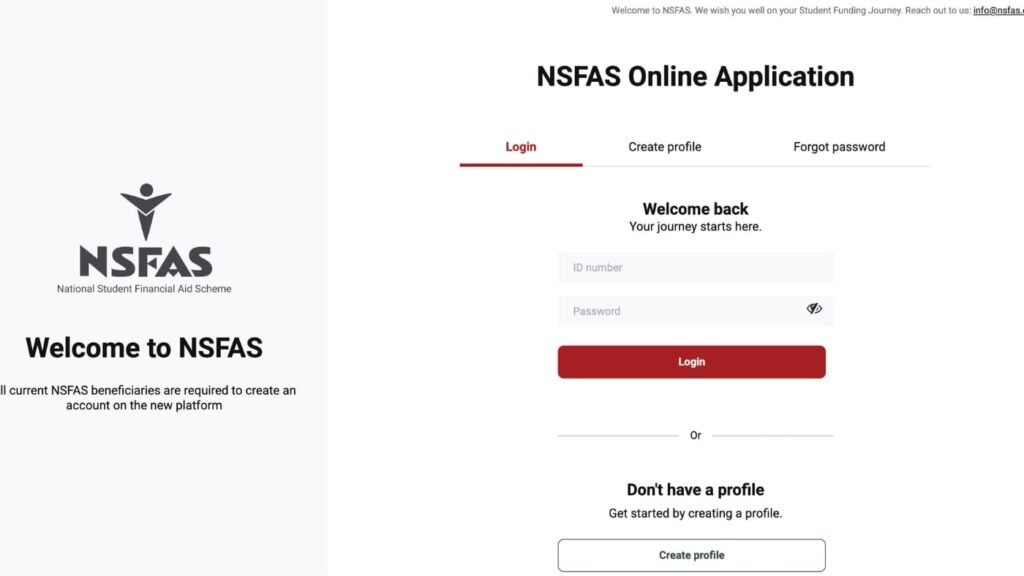
Step 3: Log Into Your myNSFAS Account
Click on the ‘myNSFAS’ button. You will use your existing account details.
- Username: Your South African ID number.
- Password: The password you created previously. If you have forgotten it, click “Forgot your password?” to reset it via email or SMS.
Step 4: Start a New Application
Once logged into your dashboard, look for the “Apply” button or tab. This will be prominently displayed during the open application period. Clicking it will start your new 2026 application. Even though you are reapplying, you are starting a fresh application form.
Step 5: Complete the Online Application Form Meticulously
You will need to fill in or confirm all sections:
- Personal Details: Verify your ID, name, and contact information.
- Household Information: You must provide current, accurate information about all family members and income earners in your household. This is a common source of errors.
- Academic Details: Select the institution and qualification you plan to study in 2026.
- Declaration: Read and consent to the terms and conditions.
Step 6: Upload Certified Supporting Documents
You cannot submit without uploading the required documents. The system will prompt you to upload clear, certified copies. Ensure each document is in the correct format and under the file size limit.
Step 7: Submit Your Application
Review every section carefully. Once you are 100% sure all information is correct and all documents are uploaded, click the final submit button. You will receive a confirmation reference number. Take a screenshot or note this number down.
Step 8: Regularly Check Your Application Status
After submission, regularly log back into your myNSFAS account and use the NSFAS status check function. Your status will progress through stages like “Submitted,” “Filtering,” “Evaluation,” and finally “Funded” or “Unsuccessful.”
Documents Needed for NSFAS Reapplication Online
All supporting documents must be clear, certified copies (not older than 3 months). Certification can be done at a South African Police Service (SAPS) station, a post office, or a Commissioner of Oaths.
Mandatory Documents for All Applicants:
- Your own certified South African ID (or birth certificate if under 16).
- Certified ID copies of both parents, guardians, or spouse.
- Proof of income (if applicable):
- Recent payslips (not older than 3 months) or employment letters.
- If unemployed: SASSA grant confirmation or signed affidavits from both parents/guardians stating they have no income.
- An affidavit confirming your household composition and income (a standard template is often provided).
Additional Documents That May Be Required:
- For SASSA Beneficiaries: Your own SASSA consent form or proof of grant.
- For Students with Disabilities: A completed Disability Annexure A Form.
- For Retired/Deceased Parents: A pension slip or death certificate.
- Proof of Acceptance: Your official acceptance or provisional acceptance letter from a university or TVET college for 2026 (can sometimes be submitted later if not available at the time of application).
Upload Tips:
- Use a scanner or a high-quality phone scanning app (like Adobe Scan).
- Save files as PDFs or JPEGs.
- Keep file names clear (e.g.,
YourSurname_ID.pdf). - Ensure each file is under 2MB in size.
Common Problems and Solutions for NSFAS Reapplication
Problem 1: “I can’t remember my myNSFAS account password.”
- Solution: Use the “Forgot Password” function on the login page. You will need access to the email or phone number linked to your account. If you no longer have access, you must contact the NSFAS Contact Centre (08000 67327) for help.
Problem 2: The system won’t accept my ID number or says it’s invalid.
- Solution: First, ensure you are typing the correct 13-digit number. If the problem persists, you may need to create a new profile. Contact the NSFAS helpline for guidance, as duplicate profiles can cause major delays.
Problem 3: I’m unable to upload my documents; the button doesn’t work or files are rejected.
- Solution: Check the file format and size. Try using a different internet browser (Google Chrome is recommended). Clear your browser’s cache and cookies. Attempt the upload during less busy hours (early morning or late evening).
Problem 4: My status has been on “Filtering” or “Evaluation” for months.
- Solution: The evaluation process takes time, especially during peak periods. Continue to check monthly. If it remains stuck well past the communicated processing times, contact NSFAS via their social media (@myNSFAS) or your institution’s Financial Aid Office (FAO) for a follow-up.
Problem 5: My reapplication was rejected due to “N+ Rule” or academic failure.
- Solution: If you have exceeded the N+ rule, you are not eligible for further funding. You would need to fund your own studies to complete your qualification. If you failed modules, you may need to appeal based on compassionate grounds (e.g., medical issues) when the appeal window opens.
Important Tips and Warnings for NSFAS Reapplication
- WARNING: BEWARE OF SCAMS. NSFAS will never ask you for your password, OTP, or payment to process your application. Anyone calling, emailing, or messaging on social media asking for these details is a scammer. All official communication is through the myNSFAS portal.
- Tip: Apply as Early as Possible. Do not wait for the deadline. Applications often open months in advance. Applying early gives you time to fix errors and avoids last-minute technical glitches.
- Tip: Accuracy is Non-Negotiable. Double-check every ID number, name spelling, and income figure. Inconsistent information is a leading cause of rejection.
- Warning: Certification Rules are Strict. Uncertified or expired certified documents will get your application rejected. Ensure the stamp and signature on copies are clear and recent.
- Tip: Visit Your Institution’s Financial Aid Office (FAO). They are experts in the process. They can check your documents, offer advice, and sometimes help resolve portal-related issues.
- Deadline is Absolute: The application closing date is final. NSFAS does not accept late submissions. Set multiple reminders.
Frequently Asked Questions (FAQ)
Q1: If I was funded this year, do I still need to reapply for next year?
A: Yes, absolutely. You must submit a new application for each academic year of study. Continuous funding is not automatic.
Q2: Can I use the same myNSFAS account to reapply?
A: Yes. You use your existing myNSFAS account (with your ID as the username) to log in and start a new application for the next year.
Q3: What is the main difference between applying and reapplying?
A: The process is identical. “Reapplying” is just the term used for returning students. You still complete a full new application form and submit new certified documents.
Q4: I am changing institutions for 2026. How do I reapply?
A: During the online application, you will select your new institution and qualification. You must also ensure you have an acceptance offer from that new institution to ultimately receive funding.
Q5: How long does it take to get a response after reapplying?
A: It can take several months. NSFAS processes hundreds of thousands of applications. Monitor your NSFAS status check on your portal regularly for updates.
Q6: What happens if my reapplication is rejected?
A: NSFAS will communicate a reason. You will have an opportunity to appeal the decision during a designated appeal period. The appeal is your chance to provide additional supporting information.
Conclusion:
Successfully knowing how to reapply for NSFAS online places you in control of your educational funding journey. It is a proactive task that requires attention to detail, patience, and timely action. By following this guide, you equip yourself with the knowledge to avoid common pitfalls, submit a compliant application, and confidently track your progress.
Remember, this process is your gateway to achieving your academic goals without the burden of upfront financial stress. Start early, be meticulous with your documents, and use only the official NSFAS channels. Your future self will thank you for the diligence you show today. Log into your myNSFAS account, begin your 2026 application, and take the next decisive step towards your qualification.
1. How to Appeal NSFAS Application Online
2. How to Appeal NSFAS Application (2026) – Complete Guide
3. NSFAS Appeal Required Documents (2026)
4. How to Apply for NSFAS Online 2026 (Step-by-Step)
5. Does NSFAS Fund Someone Who Is Repeating Grade or Module?
2 comments
I would like to know when NSFAS appeal open
We’ll let you know as soon as NSFAS makes the date available.