
NSFAS Status Not Appearing? Reasons and Solutions. Seeing a blank space where your funding decision should be is one of the most stressful experiences for any South African student. You have submitted your application, double-checked your documents, and waited patiently, but when you log in to check your progress, your NSFAS status is simply not there.
This guide is designed to help you understand exactly why your NSFAS status is not appearing and provides clear, actionable steps to resolve the issue. As the National Student Financial Aid Scheme (NSFAS) processes millions of applications, technical glitches, data mismatches, and verification delays are common. This article will walk you through the reasons behind the missing status and how to fix it, ensuring you don’t miss out on your funding.
NSFAS Status Not Appearing? Reasons and Solutions
Your NSFAS status is the heartbeat of your funding application. It tells you whether your application has been received, is being evaluated, or has been approved or rejected. When this status disappears or fails to load, it feels like you are in the dark.
This situation usually occurs because of a technical error on the myNSFAS portal, an issue with your account credentials, or a delay in data synchronization between NSFAS, your institution, and other government departments like the Department of Home Affairs or SASSA .
If you cannot see your status, you are not alone, and it does not mean your application has been rejected. It simply means there is a blockage preventing you from accessing the information. This guide is for every student who has typed in their ID number only to be met with an error message or a blank screen.
Consequences of Not Seeing Your Status
Without access to your status, you cannot:
- Know if you need to submit an appeal.
- Confirm whether your funding has been approved for registration.
- Track if your allowance payments have been processed.
- Update your personal details or upload outstanding documents.
Who This Topic Applies To
The issue of a missing NSFAS status is widespread and can affect various groups of students and applicants.
- First-time applicants: You may have just submitted your application and the system is still processing, or you might have created your myNSFAS account incorrectly.
- Returning students: If you are a continuing student, your status might not appear if NSFAS is waiting for your academic results from the university or TVET college to confirm your eligibility for renewal .
- TVET vs University students: Both sectors are affected. However, TVET students sometimes face additional delays due to the timing of registration data and trimester systems.
- SASSA grant beneficiaries: If you are a SASSA beneficiary, your status might be linked to automatic funding. If it doesn’t appear, it could be due to a data mismatch between the SASSA and NSFAS systems .
Requirements and Eligibility to Check NSFAS Status
Before diving into technical fixes, it is vital to ensure you meet the basic requirements to have an NSFAS profile in the first place. If you do not meet these, your status may not appear because you are not eligible for funding.
- Citizenship: You must be a South African citizen or a permanent resident. Your ID number is the key to your profile .
- Household income thresholds: Your combined household income must typically be R350,000 or less per year. For persons with disabilities, the threshold is R600,000 per year.
- Academic requirements: You must be accepted or registered to study at a public university or TVET college in South Africa. Returning students must meet the academic progression rules (N+ rule) to remain funded .
- Special cases: If you are an orphan, a student with a disability, or have been in foster care, you must ensure these documents are correctly loaded, as they require special verification steps.
How to Fix NSFAS Status Not Appearing (Step-by-Step Process)
If your status is not showing, follow this logical sequence of troubleshooting steps. Do not skip steps, as the solution is often the simplest one.
Step 1: Verify You Are Logging in Correctly
This is the most common reason for a “missing” status. You might be in the wrong section or using incorrect details.
- Go to the official NSFAS website:
www.nsfas.org.za. - Click on myNSFAS account in the top right corner.
- Enter your ID number and password. Remember, your username is almost always your ID number .
- If you cannot log in, do not create a new account. This will cause duplicate profiles. Instead, reset your credentials .
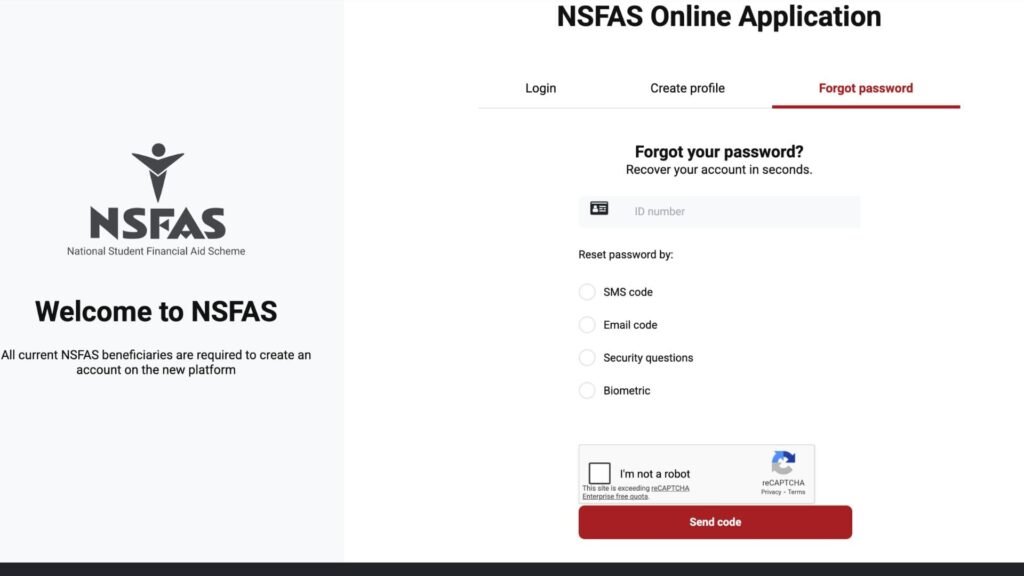
Step 2: Reset Your Password or Username
If you are getting “incorrect login details,” use the official recovery tools .
- On the login page, click “Forgot Password” or “Forgot Username.”
- Enter your ID number.
- Check your email and SMS for a One-Time Pin (OTP) or reset link .
- Create a new strong password. Ensure it has uppercase, lowercase, and special characters.
- Once reset, log in again and navigate to “Track Funding Application” to see your status.
Step 3: Use the USSD Method
If the website is down or your data is slow, bypass the internet completely .
- Dial 12067327# from your cellphone.
- Follow the prompts.
- Enter your ID number.
- Your status will be displayed on your phone screen instantly. This confirms whether the issue is with the website or your actual application .
Step 4: Clear Browser Cache or Use the App
Old data in your browser can cause the portal to load incorrectly .
- Clear your browsing history, cache, and cookies.
- Try using “Incognito Mode” or “Private Browsing.”
- Alternatively, download the official myNSFAS app from the Google Play Store or Apple App Store and log in there .
Step 5: Check Your Email for Direct Communication
Sometimes, your status does not update on the portal because NSFAS has sent you a direct query.
- Log in to the email you used for your application.
- Check your inbox and spam/junk folder.
- If NSFAS needs more documents or if there is a specific issue, they will email you. Your online status may remain blank until you respond.
Documents Needed
A missing status can sometimes be linked to missing or incorrect documents. If your application is stuck in a verification loop due to bad documents, it might appear as if there is no status update. Ensure you have the following ready to upload if requested :
- Certified ID Copy: Your green ID book or smart ID card. Must be certified within the last 3 months.
- ID copies of Parents/Guardians/Spouse: Certified copies of the IDs of everyone listed in your household income declaration.
- Proof of Income: Payslips (last 3 months), UIF letter, pension slip, or an affidavit if unemployed.
- Disability Annexure: If applicable, a completed and signed Disability Annexure A form.
- Vulnerable Child Declaration: If you are an orphan or in foster care, the relevant court orders or declarations.
Upload Tips:
- Ensure files are in PDF format.
- Files must be clear and legible.
- Do not upload uncertified documents, as this will delay your application indefinitely.
NSFAS Status Not Appearing Common Problems and Solutions
Here are specific errors and scenarios students face when their status is missing, with practical solutions.
“No Application Found”
- Problem: You log in and it says you have no application.
- Solution: You may have created a profile but never actually submitted the application. Go to the “Apply” section and check if there is a draft. If not, you may have to wait for the next application window, or if you are a SASSA beneficiary, your application should be automatic. Contact NSFAS to confirm your ID is linked to the correct profile .
Stuck in “Evaluation” Forever
- Problem: Your status shows “Evaluation” and hasn’t moved in months.
- Solution: This means NSFAS is verifying your details with SARS, Home Affairs, or your institution. It can take time due to high volumes. However, if it has been over 3 months, you need to log a query. There might be a data mismatch, like your name being spelled differently at Home Affairs .
Portal Says “Login Details Wrong” Even When Correct
- Problem: You are sure your password is right, but it rejects it.
- Solution: The account might be locked due to multiple failed attempts. Use the “Forgot Password” function immediately to reset it. Also, ensure your CAPS LOCK is off and you are using your ID number, not a username .
NSFAS Registered Status on SASSA
- Problem: You are trying to apply for a SASSA SRD grant, but it says you are “NSFAS Registered,” yet you have no NSFAS status appearing.
- Solution: This means NSFAS has your ID on their database, even if you are not funded. You may have applied before and been rejected, or someone used your ID fraudulently. You must apply for reconsideration on the SASSA website and provide proof you are not an NSFAS beneficiary .
Accommodation or Allowances Not Reflecting
- Problem: Your funding is approved, but your allowance status is blank.
- Solution: This is often due to the institution not confirming your attendance or registration data to NSFAS. Contact your university or TVET financial aid office first. NSFAS cannot pay allowances if the institution has not validated that you are registered .
Important Tips and Warnings on NSFAS Status
Navigating the NSFAS system requires caution. Here are critical tips to keep you safe and ensure your application stays on track.
- Avoid Scams: NSFAS will never ask you for money to unlock your account or to make your status appear. They will never ask for your password via WhatsApp or direct message. Ignore anyone offering to “fix” your status for a fee .
- Deadlines are Final: While the system might be down, the deadline for appeals or document submission is not flexible. If you are waiting for the system to work to submit an appeal, visit your institution’s financial aid office immediately for help. Do not wait for the website to come back online if the deadline is approaching.
- One Profile, One ID: Never create a second myNSFAS account. If you have a duplicate profile, your status may appear on one and not the other, causing massive delays. If you suspect you have a duplicate, contact NSFAS support to merge them.
- Keep Your Contact Info Updated: If your cellphone number or email changes, update it on your myNSFAS profile immediately. Most login resets and status updates are sent via SMS .
Frequently Asked Questions (FAQ)
Why is my NSFAS status not showing after application?
It could be due to high traffic on the website, a technical glitch, or your application being in a queue for evaluation. Try checking via USSD (12067327#) to see if the system recognizes your ID .
How long does NSFAS evaluation take?
The evaluation stage can take anywhere from a few weeks to a few months, especially during peak application periods. It depends on how quickly NSFAS can verify your details with external bodies like SARS .
Can I check my NSFAS status without logging into the portal?
Yes. You can dial 12067327# on your cellphone and follow the prompts to receive your status via SMS or on your screen. You can also contact the NSFAS contact centre at 0800 067 327 .
What does it mean when my NSFAS status says “Application Submitted”?
It means NSFAS has received your application, but they have not started verifying it yet. It is the first stage in the process .
What if my status is stuck on “Waiting for Academic Results”?
NSFAS is waiting for your institution to upload your academic results to confirm you passed and qualify for continuing funding. You should check with your university or TVET college to ensure they have sent the results to NSFAS .
Why does SASSA say I am NSFAS registered when I am not?
This usually means your ID was used in an NSFAS application previously, or there is a data error. You need to lodge a reconsideration application on the SASSA SRD website to dispute this status .
I forgot my NSFAS password, and my status is not showing. What do I do?
Go to the myNSFAS login page and click “Forgot Password.” Enter your ID number, and follow the link sent to your email to create a new password. Once you log in, your status should be visible .
The NSFAS website is down. How can I get help?
Try using the myNSFAS mobile app, or call the NSFAS call centre on 0800 067 327. You can also visit the financial aid office at the institution where you applied or are studying .
Will I lose my funding if I can’t log in to check my status?
No, not being able to log in does not cancel your funding. However, you must resolve the login issue promptly to ensure you don’t miss requests for documents or appeal deadlines. If you are funded, the money will still be allocated.
Conclusion
Not seeing your NSFAS status can be a frustrating experience, but it is usually a problem that has a solution. By following the steps outlined in this guide—starting with a simple password reset, trying the USSD code, and moving on to checking your documents—you can usually uncover the missing information.
Remember, NSFAS funding is a lifeline for millions of South Africans, and the system is designed to help you, not hinder you. If technology fails, reach out to human support. Visit your campus financial aid office or call the NSFAS helpline. Stay persistent, keep your documents ready, and do not let a blank screen stop you from pursuing your education. Your future is worth the effort.
1. NSFAS Provisional Funding Eligibility Requirements
2. What is “NSFAS Waiting Evaluation”? – Complete Guide
3. What Does NSFAS Status Processing Mean? (Complete Guide)
4. How to Track NSFAS Application Online (Complete Guide)
5. How to Check NSFAS Status Online (Complete Guide)
1 comment
apply nsfas to buy books and needs of school