
How to Check NSFAS Status Online in 2026: A Complete Guide. The National Student Financial Aid Scheme (NSFAS) is the key to funding tertiary studies for millions of South African students. Once you’ve applied, the waiting begins. This is where the NSFAS status check becomes your most important tool.
Knowing how to check your NSFAS status online matters because it gives you control and clarity. It tells you if your application is complete, if you’re financially eligible, or if your funding is approved. Instead of worrying, you can take informed action. This definitive guide will walk you through every step, meaning, and solution for your NSFAS status check in 2026.
What Is NSFAS Status Check and Why It Matters
An NSFAS status check is the process of logging into your official myNSFAS account portal to see the current stage of your funding application. It is a real-time update that communicates decisions from NSFAS directly to you.
Who the NSFAS Status Check Is For
This process is vital for:
- Applicants waiting for a decision.
- Approved students tracking allowance payments.
- Returning students confirming continued eligibility.
- Anyone who needs to see if additional documents are required.
What Your Status Means for Your Funding
Your status is the gateway to comprehensive funding. A positive status update leads to coverage for:
- Full tuition fees paid to your institution.
- Accommodation (in residence or a private allowance).
- Learning materials, living, and personal care allowances.
Checking your status regularly is how you confirm this support is on track.
Who This Topic Applies To
Understanding the status check is non-negotiable for:
- First-Time Applicants: Grade 12 learners and new applicants who have submitted an application and are anxiously awaiting a result.
- Returning NSFAS Students: Those who received funding before and must confirm they meet academic progression (N+ rule) to be funded for the next academic year.
- TVET College Students: Trainees at Technical and Vocational Education and Training colleges use the same myNSFAS portal for status checks as university students.
- University Students: All undergraduates at public universities funded by NSFAS.
- Parents & Guardians: Individuals supporting a student who need to help monitor the application outcome.
- SASSA Grant Beneficiaries: While financially auto-qualified, these students must still apply and check their status for academic admission confirmation.
Requirements and Eligibility for NSFAS Status Check
Before you can even check a status, you must meet the core eligibility criteria for funding. Your status is a reflection of these requirements.
Citizenship
You must be a South African citizen or permanent resident to qualify for NSFAS funding, which will be reflected in your status.
Household Income Thresholds
Your application is means-tested. The thresholds are:
- Up to R350,000 per annum for students with disabilities.
- Up to R600,000 per annum for all other students.
Your status will indicate if you’ve passed this “Financial Eligibility” test.
Academic Requirements (Where Applicable)
- New Applicants: Must have a Grade 12 certificate and a firm offer or provisional acceptance from a public institution.
- Returning Students: Must pass at least 50% of their modules and stay within the N+ rule of their qualification.
Your status may show “Awaiting Academic Results/Admission” until your institution confirms this.
Special Cases
Students who are orphans, from child-headed households, or have a disability are prioritised. Having documentation for these cases can influence your application timeline and status.
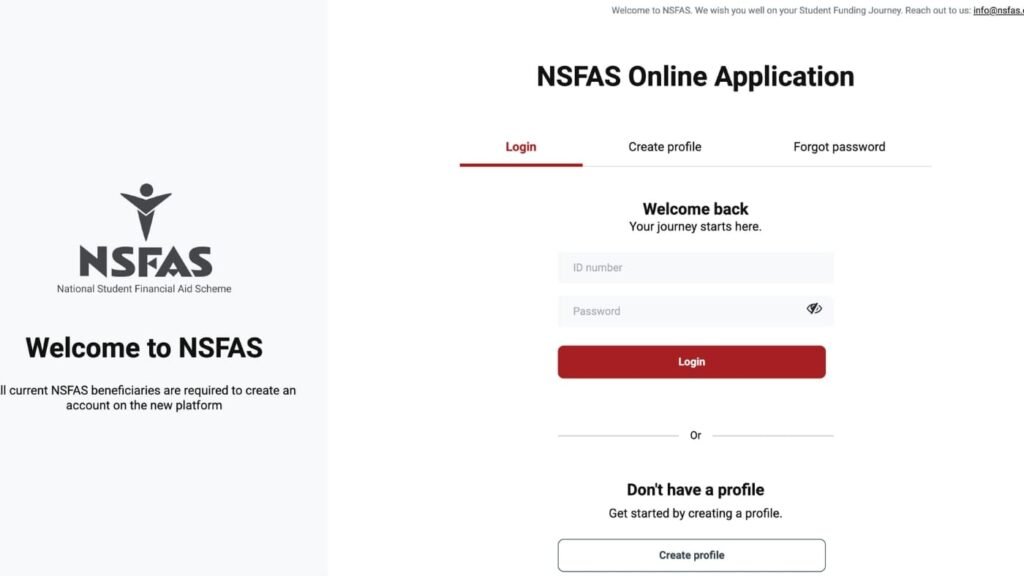
How to Check NSFAS Status Online (2026): Step-by-Step Process
Follow this simple, numbered guide to check your status without stress.
Step 1: Ensure You Have Your Login Details
You cannot check your status without your myNSFAS account credentials. This is the username and password you created during application. Have them ready.
Step 2: Visit the Official NSFAS Website
Open your internet browser and go to the official NSFAS website. Always double-check the URL to avoid fraudulent sites.
Step 3: Access the myNSFAS Portal
On the NSFAS homepage, locate and click on the ‘myNSFAS‘ button or link. This will take you to the secure login portal.
Step 4: Log Into Your Account
- Enter your username (often your email address or ID number).
- Enter your password.
- Click “SIGN IN.” You may be sent a One-Time Pin (OTP) to your registered cellphone for security.
Step 5: Navigate to ‘Track Funding Progress’
Once logged in, you will land on your dashboard. Look for a tab or button labelled “Track Funding Progress” or “Check Your Application Status.” Click on it.
Step 6: Understand Your Status
Your current status will be displayed clearly on the screen. Take note of the exact wording. The common statuses are explained in detail in the next section.
Step 7: Take Required Action
If your status requests additional documents or an appeal, use the portal’s upload function immediately. If approved, proceed to sign your NSFAS Bursary Agreement (NBA).
Understanding Your NSFAS Status Meanings
Your status is a short phrase with a big meaning. Here’s what each one really means.
“Application Submitted”
Your application has been received successfully. No documents are missing at this point. NSFAS now begins the evaluation process.
“Filtering”
NSFAS is conducting initial checks against government databases (SARS, DHET, etc.) to verify the information you provided.
“Funding Eligibility”
This is a big one. It means you have PASSED the financial means test (your household income is within the threshold). NSFAS is now waiting for confirmation from your chosen institution that you are academically admitted to a funded programme.
“Awaiting Academic Results / Admission”
NSFAS has sent a query to your institution. They are waiting for your school results (Grade 12) or confirmation of your admission/registration for the academic year.
“Provisionally Funded”
You are conditionally approved pending your final Grade 12 results meeting the minimum entry requirements for your chosen course.
“Approved”
Congratulations! Your funding has been officially approved. The next critical step is to log in and sign your NSFAS Bursary Agreement (NBA). Funding is only finalised once this is signed.
“Awaiting Registration”
NSFAS has received your admission confirmation and is now waiting for your institution to submit your registration data so they can create a payment schedule.
“Signed Agreement”
You have successfully signed your NBA. Allowances will now be processed according to your institution’s schedule.
“Payment”
Your allowances are being processed or have been released to your institution or direct payment partner.
“Unsuccessful / Rejected”
Your application did not meet all the requirements. You will be given a reason. You have the right to appeal during the official appeal window.
Documents Needed for Status-Related Actions
Often, your status will require you to submit documents. Here’s what you need.
List of Commonly Requested Documents
- Certified ID Copy: If your initial upload was unclear or rejected.
- Proof of Registration/Admission Letter: From your university or TVET college, often requested if your status is “Awaiting Admission.”
- Academic Transcript/Results: For returning students to prove progression.
- Consent Form: If it wasn’t uploaded correctly the first time.
- Appeal Supporting Documents: If appealing a rejection, you need documents that counter the reason for rejection (e.g., correct proof of income).
Certification Rules for Uploads
Any document you upload must be certified. The certification must be:
- Dated within the last 3 months.
- Stamped and signed by a Commissioner of Oaths, police officer, or post office official.
- Clearly state “Certified true copy of the original.”
File Formats and Upload Tips
- Scan documents clearly. Use PDF, JPEG, or PNG formats.
- Keep file sizes manageable (under 2MB).
- Name your files clearly: “Surname_ID_Appeal.pdf.”
- Before submitting, preview the upload to ensure all text is readable.
Common Problems and Solutions
Students frequently face these issues when checking their status.
“Invalid ID or Password” Error
- Solution: Use the “Forgot Password” function. You will need your registered email or phone number to reset. Do not create multiple accounts. If you forgot your username, use the “Forgot Username” option.
Status Stuck on “Awaiting Admission” or “Funding Eligibility”
- Solution: This is often an institution delay. Contact your university or TVET college’s Financial Aid or Admissions Office. Confirm they have submitted your registration data to NSFAS. Provide them with your NSFAS reference number.
Status Says “Unsuccessful” But You Believe It’s an Error
- Solution: Do not panic. Note the reason given. Log into the myNSFAS portal during the official appeal period (dates will be announced). Upload a detailed appeal letter and the correct supporting documents that address the reason for rejection.
No Status Update for Weeks/Months
- Solution: First, check the official NSFAS social media pages for announcements on system delays. If there are none, you can try contacting NSFAS via their official channels, but be patient. High application volumes cause delays.
Cannot Receive the OTP to Log In
- Solution: Ensure you are using the cellphone number registered with your myNSFAS account. If you lost that number, you must contact NSFAS directly to update your contact details, which can be a lengthy process.
Important Tips and Warnings
Avoiding Scams
- NSFAS will never ask for your login password or OTP via email, phone, or WhatsApp. Anyone who does is a scammer.
- Only use the official myNSFAS portal on the NSFAS website. Do not click on links from social media ads claiming to “check your status instantly.”
- There are no agents. You alone are responsible for your application and status check.
Deadlines to Watch
- Application Deadline: Apply months before the closing date (usually in January). Late applications are a primary reason for “Unsuccessful” statuses.
- Appeal Window: If rejected, you typically have 30 days to appeal once the window opens. Mark this date.
- Agreement Signing Deadline: If approved, sign your NBA immediately. There is a deadline, and missing it can void your funding.
Common Mistakes Students Make
- Creating multiple myNSFAS accounts. This causes system confusion and locks your profile. Use one account only.
- Ignoring requests for documents. If your status asks for something, upload it within 7 days.
- Not checking their status regularly. You miss critical updates and deadlines.
- Not reading the status description properly. “Funding Eligibility” does not mean “Approved.”
Frequently Asked Questions (FAQ)
Q: How often should I check my NSFAS status?
A: Check once a week during decision periods. Avoid checking multiple times a day, as statuses are updated in batches, not instantly.
Q: Can I check my NSFAS status without myNSFAS account?
A: No. The myNSFAS account is the only official platform for a secure, personalised status check. There is no SMS or email-only service.
Q: My status says “Approved.” What happens next?
A: Congratulations! You must now log in, find the “Bursary Agreement” section, and sign it online. Then, await allowance payments via your institution.
Q: What does the N+ rule mean for my status?
A: For returning students, your status for the next year depends on you passing enough modules to stay within the N+ rule. If you fail, your status may change to “Unsuccessful.”
Q: I am a SASSA beneficiary. Will my status be different?
A: Your financial eligibility is automatic, so you may move past “Funding Eligibility” faster. However, your status will still depend on academic admission and registration like everyone else.
Q: Who do I contact if my status is clearly wrong?
A: First, use the “Query” function within your myNSFAS portal. You can also try contacting NSFAS via their official Twitter (@myNSFAS) or Facebook page for public queries.
Other Methods to Check Your NSFAS Status
Officially, the primary and most reliable method to check your NSFAS status is through your myNSFAS online account portal on the NSFAS website. This portal provides real-time, detailed, and secure updates specific to your application.
However, NSFAS has occasionally supported alternative channels for status updates, especially during peak periods. It is crucial to note that these methods are supplementary and may not provide full details. They should not replace checking your myNSFAS account.
Official Supplementary Methods
1. NSFAS WhatsApp Chatbot
This is an official, automated service for basic queries.
- How it works: Save the number 078 519 4876 in your phone contacts. Send “Hi” on WhatsApp to initiate a chat. The bot will ask for your ID number to retrieve basic status information.
- What it shows: It can typically confirm if your application was received and give a high-level status (e.g., “Application Successful,” “Pending,” “Rejected”). It will NOT show detailed statuses like “Awaiting Academic Admission” or allow you to upload documents.
- Best for: A quick, mobile-friendly check to see if a final decision has been made.
2. SMS Notifications (One-Way Communication)
NSFAS sometimes sends bulk SMS notifications for critical updates.
- How it works: This is not a method you initiate. NSFAS sends SMSes to the cellphone number registered on your myNSFAS account for major milestones (e.g., “Your NSFAS application has been approved. Please log in to sign your agreement.”).
- Important: Never reply to these numbers or send your ID number to random numbers claiming to be NSFAS. Scammers use this tactic. Official NSFAS SMSes will only inform you to log into your portal for details.
- Best for: Receiving important alerts, but you must still log into myNSFAS to take action.
3. Contacting the NSFAS Call Centre
You can call for assistance, but agents cannot see more than what is in your portal.
- NSFAS Contact Number: 08000 67327
- How it works: After navigating the IVR menu, you will speak to an agent. You will need to verify your identity. They can read out the status that appears on your application in their system.
- Limitation: They cannot explain complex issues, override decisions, or process documents over the phone. For complex issues, they will likely create a case number and refer you back to the portal or your institution.
- Best for: If you are completely unable to access your myNSFAS account due to technical issues (e.g., lost phone number for OTP).
4. Visiting Your Institution’s Financial Aid Office
This is often the fastest way to resolve status confusion related to academic admission or registration.
- How it works: Your university or TVET college’s financial aid office has a direct relationship with NSFAS. They can often see on their side if your “Funding Eligibility” status is waiting for their action (e.g., submitting your registration data to NSFAS).
- What they can do: They can clarify if delays are on the institution’s side, provide guidance on appeals, and sometimes escalate queries directly to their NSFAS liaison.
- Best for: When your status is stuck on “Awaiting Academic Results/Admission” or “Awaiting Registration.” Bring your student number and ID.
Unofficial/Third-Party Methods to AVOID
- Social Media “Agents” or “Helpers”: Any person or page on Facebook, Instagram, or WhatsApp claiming they can check your status for a fee or if you send them your ID and password is a SCAM. NSFAS has no agents.
- Unofficial Websites/Apps: Do not enter your myNSFAS login details on any website other than the official https://www.nsfas.org.za. Fake phishing sites steal your information.
- Email Links from Unknown Senders: NSFAS will not send your status via email. Do not click on links in emails claiming to be from NSFAS unless you are 100% sure they are official.
Conclusion:
Checking your NSFAS status online is a simple but powerful habit. It moves you from a place of uncertainty to a place of control. By using your myNSFAS account correctly, understanding the status meanings, and acting promptly on requests, you actively manage your funding journey.
Remember, delays are common but not permanent. Use the solutions provided here before you panic. Your education is worth this effort. Log in today, check your status, take the next step, and keep moving forward towards your goals. Your future is waiting.
Check also:
1. How to Login MyNSFAS Account – Complete Guide
2. How to Create NSFAS Account – Step-by-Step Guide
3. How to Apply for NSFAS Online – Complete Step-by-Step